Appearance
Preflight findings
Every message the preflight report can show, what it means, and what to do about it. Words in italics stand for the names in your document.
Serious findings have a red icon: the graphic is likely to go to air wrong. Worth knowing findings are amber: the graphic plays, but not the way you might expect. Neither stops an export or a sync.
Find a message with Ctrl+F in your browser, or the manual's search.
The document
There are no artboards, so the file has nothing to play.
Serious. The document has no artboard at all. Add one with the artboard tool, or File › New.
This artboard is empty: it renders nothing.
Worth knowing. An artboard with no objects. If it is a leftover, delete it. If it is a component you have not built yet, it is fine for now.
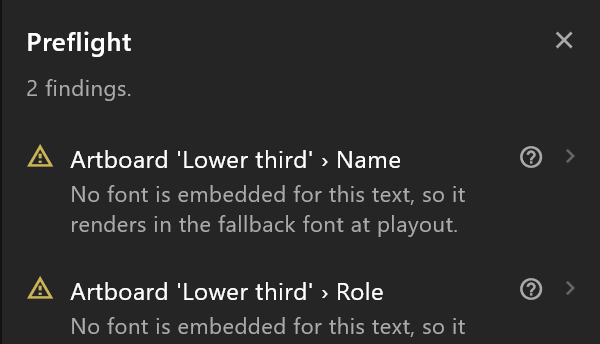
No font is embedded for this text, so it renders in the fallback font at playout.
Worth knowing. The text uses a font the document does not carry, so the playout server draws it in a stand-in font. Choose a font from the text's Font row, or import the font in the Assets panel. See Fonts.
Data
The enum name has no values, so this property has nothing to set.
Serious. Full message: "… has no values, so this property has nothing to set. Add its values in the Data panel, or point the property at another enum." Type the enum's values in the Enums section of the Data panel.
This property is an enum, but the document has no enums.
Serious. Full message: "… Add one in the Data panel and choose it, or change the property to another kind." An enum property needs an enum to take its values from.
This property is an enum with none chosen.
Serious. Full message: "This property is an enum with none chosen. Choose one in the Data panel, or change the property to another kind."
This instance has no value for properties
Serious. Full message: "… so the file declares a property nothing can bind - a live source bound to it would show the placeholder instead. Re-add the property in the Data panel." An instance is missing values for the view model's newest properties, which happens only in documents built outside the editor. Delete the properties it names and add them again.
target is bound to property, but this artboard has no view model.
Serious. A binding reads a property, and the artboard has no view model to read it from. Choose the artboard's View model in its inspector, or remove the binding.
target is bound to property, which no longer exists in the view model name. The value will never arrive.
Serious. The property was renamed or deleted after the binding was made. Click the finding to select the object, and bind the row again from its diamond.
N events are called name.
Worth knowing. Full message: "… The controller fires events by name, so it cannot tell them apart." Give each event its own name.
Timelines
Its work area markers have no length between them, so the export widens the range to the whole timeline.
Worth knowing. Full message ends: "Move a marker, or turn the work area off." See Work area.
Pictures and live slots
This image has no asset and nothing bound to it.
Serious. Full message: "… At playout there is no placeholder to size the video texture from, so it stays blank." A picture object with no picture. Choose one in its inspector, bind it to an image property, or delete it.
This picture shows slot but is not in a layout
Worth knowing. Full message: "… so at playout the frame is drawn at its own pixel size and its Fit does nothing: a source smaller than W × H draws smaller. Put it in a layout, or fill a shape with the live texture." Press Put it in a layout in the picture's inspector. See Live video slots.
Animation States and listeners
There are no Animation States, so the controller has nothing to drive.
Worth knowing. The graphic plays its first timeline and nothing else: no take in, no take out. Add Animation States in the Animations panel. See Animate with Animation States.
None of the Animation States is marked as the default, so a player has to be told which to run.
Worth knowing. Right-click the Animation States that should run in the Animations panel and choose Make default Animation States.
This listener has no target, so nothing can trigger it.
Worth knowing. Choose what it listens to in the listener's panel.
Its target was deleted, so the listener never fires.
Serious. The object it listened to is gone. Choose another target, or delete the listener.
object has nothing to hit: a pointer listener needs a shape with a fill or a stroke, or the artboard as its target.
Worth knowing. A click can only land on something drawn. Give the shape a fill (it can be fully transparent), or target the artboard.
This listener does nothing: it has no actions.
Worth knowing. Add an action in the listener's panel, or delete it.
Scripts
N scripts written here (names). They carry no signature other players accept
Worth knowing. Full message ends: "… so they run in airZ Editor, the controller and airZ Engine, and are inert in any other player." Nothing to fix for airZ playout. If the file goes to another player, the parts drawn by scripts will be missing there.
N scripts arrived compiled (names).
Worth knowing. Full message: "… Their bytecode and signature travel through untouched, and their input values can be changed, but the code cannot." These came in with an imported file. Their inputs can be set in the scripted object's inspector.
3D
Each 3D finding in one line: what it says, and what to do. The settings they name are on the 3D pages.
| The message begins | What to do |
|---|---|
| Nothing in this document asks to be traced, but it still declares flag. | Delete that property in the Data panel, or turn ray tracing on for the layer that wants it |
| This 3D viewport has no poster. | Make a poster in the viewport's inspector, so other players show a still |
| The poster shows an earlier version of this 3D scene. | Update the poster in the viewport's inspector |
| The viewport name encodes its pixels for HDR | Only worth it when the playout chain is 10-bit; otherwise set the output back |
| The material name shows … at 80 % brightness: its base colour is the default grey | Set the material's base colour to white |
| The material name takes its … from the live texture slot, which is not an image property | Pick the live texture again in the material |
| The material name mirrors the scene but is unlit | Set the material's model to Lit |
| … materials mirror the scene in this viewport | Keep one mirror per viewport |
| The emitter name would keep … particles alive | Lower the emitter's rate or life |
| object … so its mesh is rewritten every frame | Use fewer segments, or a lighter mesh |
| The shader name on material name is not compiled | Compile it in the material's inspector |
| The shader name on material name was compiled from earlier code | Compile it again |
| Shading the 3D layer name costs about … | Lower the layer's render scale, or carry fewer looks |
| The 3D layer name costs about … ms a frame in effects alone | Lower the render scale, or drop an effect the shot can do without |
| The light name asks for … shadow maps, and draws one | Set its shadow detail back to one map |
| The 3D layer name answers touch. Playout has to forward the touches to it | Make sure playout forwards touches, or the shot plays as authored |
| The 3D layer name asks for deep output, but this artboard’s data has no true/false property | Turn Deep output off and on again |
| The 3D layer name asks for ray tracing, but this artboard’s data has no true/false property | Turn Ray tracing off and on again |
| Traced: … objects bend or morph | Nothing to fix; the layer needs more memory for them |
| The 3D layer name has ambient occlusion on. It is not traced | Nothing to fix; it stays as you see it here |
| Traced reflections: … almost fully rough | Lower the roughness, or turn the material's reflection off |
| Tracing this layer is estimated at … | Trace shadows or reflections rather than both, or make the scene lighter |
| The 3D layer name has ray tracing on with neither traced shadows nor traced reflections | Turn one of them on, or ray tracing off |
| … is a shadow catcher, but … | Turn on ray tracing and traced shadows, or take the catcher off the material |
| Depth of field on this layer costs about … | Close the aperture when the shot does not need it, or lower the render scale |
| The camera name is focused at … which is outside what it can see | Move the focus inside the clip range, or open the range |
| The 3D layer name is masked by a shape that is no longer on this artboard | Pick a shape again under Mask, or set it to none |
| A tap on the 3D layer name writes to … which is not a … of this artboard | Pick the property again under Touch |
| The data text name shows … which its character set lacks | Add the characters to its set in the inspector |