Appearance
States
What plays while the Animation States are here.
Click a state in the graph to see it.
The three kinds
| Kind | What it plays | Use it for |
|---|---|---|
| Animation | One timeline, at a speed you choose | Most states: on, off, idle, a loop |
| Blend 1D | Several timelines mixed along one number | A dial, a gauge, a meter — one value moves smoothly between poses |
| Blend Direct | Several timelines, each with its own weight | Independent amounts that overlap, such as a face's expressions |
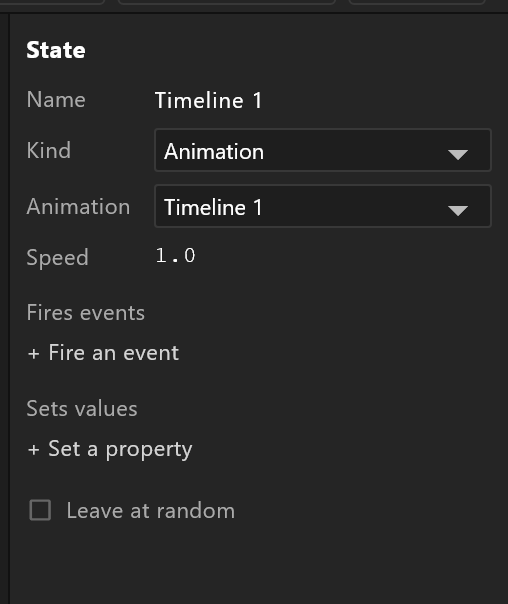
An Animation state
| Row | What it does |
|---|---|
| Name | What the graph shows. Picking a timeline names the state after it |
| Animation | Which timeline plays |
| Speed | A multiplier. 0.5 is half speed; a negative number plays it backwards |
A blend state
Blend 1D asks what drives it — Driven by — and then each animation gets a value: the driver value at which that timeline is fully on. Between those values the timelines are mixed.
A gauge from 0 to 100 is three animations at 0, 50 and 100, and a number property driving it. No transitions, no conditions: the data moves the needle.
Blend Direct gives each animation its own driver instead, so several can be partly on at once.
Reset on apply starts the blend's animations from their beginning each time the state is entered.
What a state can do besides play
Fires events — the state reports an event on start or on end. That is how a graphic tells the control system "I am fully on" or "I have finished leaving", so a rundown can move on at the right moment rather than on a stopwatch.
Sets values — the state writes a view-model property on start or on end. Useful for the Animation States' own bookkeeping: a state that sets shown to true as it comes on, so other layers can react.
Leave at random picks among the outgoing transitions by weight rather than taking the first valid one — idle variations that do not repeat in the same order.
The system states
Entry, Any State and Exit have no settings of their own: "System state. Entry starts the layer; Any State transitions apply from every state; Exit ends the layer."
Entry and Any State can still leave at random, since they have transitions going out.