Appearance
Transitions and conditions
When the Animation States move, how long the move takes, and what has to be true first.
Click the disc in the middle of a transition.
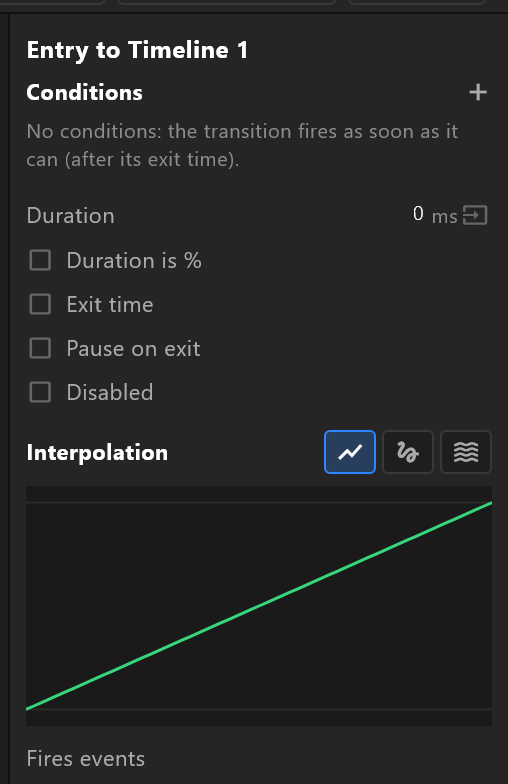
Conditions
+ adds one. A condition tests something and the transition waits until it holds.
| What you can test | Examples |
|---|---|
| A view-model property | shown is true, score > 100, state = Live |
| The artboard | width, height, ratio — for a graphic that must behave differently in a 16:9 and a vertical version |
| A legacy input | Kept working for older documents |
Comparisons depend on the type: numbers take =, ≠, <, ≤, >, ≥; text, colours and enums take = and ≠; a boolean reads is true or is false; a trigger has nothing to compare — the row reads fired.
The right-hand side can be a value you type, or another property, so a transition can fire when score passes target.
Several conditions all have to hold. There is no "or" — for that, wire two transitions.
The one thing that catches everyone
A value condition fires whenever it holds, every frame the from-state is current. A trigger fires once.
So a transition whose only condition is shown is true will fire again the moment it returns to that state, for as long as shown stays true. If you mean "do this once, when I say so", use a trigger or an exit time.
The panel says the same thing under the conditions list, and it is worth reading twice.
With no conditions at all, a transition fires as soon as it is allowed to — immediately, or after its exit time.
Timing
| Row | What it does |
|---|---|
| Duration | How long the blend from the old state to the new one takes. 0 is a cut |
| Duration is % | The duration as a percentage of the animation's length rather than in milliseconds |
| Exit time | The transition may not fire before the state's animation reaches this point. This is how "let the in-animation finish first" is expressed |
| Exit at and Exit time is % | Where that point is, in milliseconds or as a percentage |
| Early exit | Lets it leave before the exit time when the conditions hold |
| Pause on exit | The state being left is paused during the blend rather than kept playing |
| Disabled | The transition is never taken. It stays wired, drawn grey — useful while debugging a graph |
| Weight | Its share when the state it leaves has Leave at random on |
Duration can be driven by data. The button beside it reads the duration from a number property, so a control system can decide how fast a graphic changes.
Easing
A transition eases like a keyframe does: Linear, Cubic with a curve you can shape and presets (Ease, Ease In, Ease Out, Ease In Out, Snappy), or Elastic with its amplitude and period.
This is the blend between two states, so it is what gives a change of state its character — a snappy toggle, or something that settles.
Events and values
Like a state, a transition can fire events and set values, on start or on end. A transition that sets shown = false as it starts leaving keeps the rest of the graph honest.