Appearance
Export PNG and sequence
A still of what is on the stage, or every frame of a timeline as numbered pictures with transparency — for a thumbnail, a review, or another program.
Both are in the File menu: File › Export frame as PNG… and File › Export PNG sequence….
A single frame
Export frame as PNG… saves the stage as it is now — the artboard you are on, at the playhead — as one PNG. It asks where, suggesting <document>-frame.png.
Use it for a thumbnail, or to send someone a picture of a state the graphic is in. What is saved is the artwork only: no guides, no safe areas, no selection.
A sequence
Export PNG sequence… renders a timeline frame by frame.
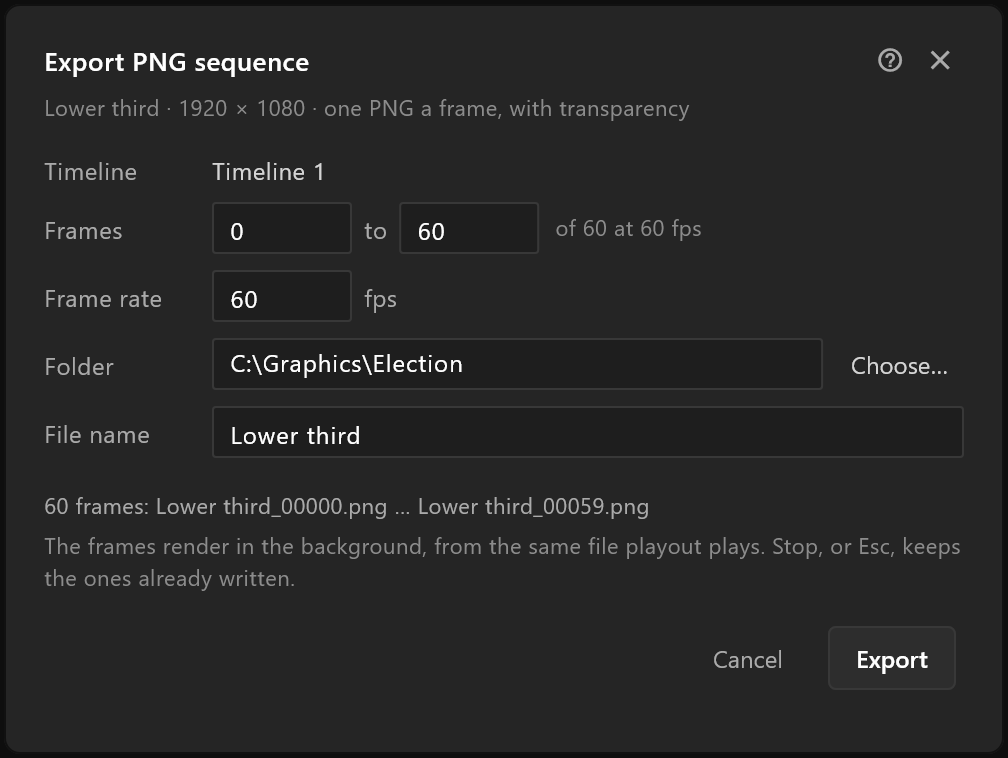
The line under the title says what you will get: the artboard, its size, and "one PNG a frame, with transparency".
| Row | What it does |
|---|---|
| Timeline | Which timeline to render. With one, it is named; with more, choose |
| Frames | From which frame to which. It starts as the work area when the timeline has one, otherwise the whole timeline. Beside it: how long the timeline is, and its rate |
| Frame rate | How many pictures a second to write, 1 to 240. It starts at the timeline's own rate |
| Folder | Where the pictures go. Choose… picks it. It starts beside the document, then remembers your last folder |
| File name | The start of every picture's name. It starts as the document's name |
Under the rows the window says exactly what it will write, for example "60 frames: Lower third_00000.png … Lower third_00059.png". If pictures of that name are already in the folder, it warns first: "Replaces 60 frames of that name already in the folder."
When something is wrong, the window says what, in the order you would fix it, and Export waits: no timeline, an end before the start, a frame rate out of range, a name with a character a file cannot have, no folder.
While it renders
The frames render in the background, from the same file playout plays, so the pictures match what goes to air. A progress window counts them: "Rendering frame 12 of 60". Stop, or Esc, stops it and keeps the frames already written. When it finishes, the editor says how many it wrote and where, with a way to open the folder.