Appearance
Listener
A listener waits for something — a click, a key, a property changing — and then does something. This is where you say what it waits for and what it does.
Select a listener in the Animation States graph's Listeners list, or make one with Add listener ▸ on an object's right-click menu in the Hierarchy: that makes the listener, targets the object and selects it, in one step.
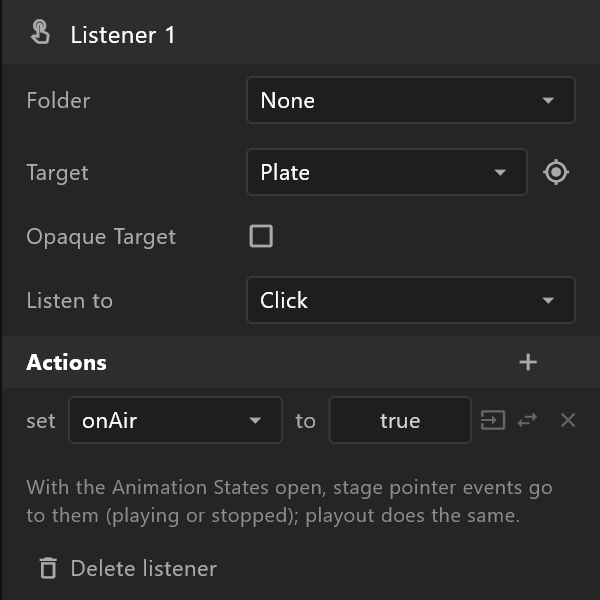
What it listens to
| Row | What it does |
|---|---|
| Folder | Groups listeners in the Listeners list. New folder… makes one. It changes nothing in the graphic |
| Target | What the listener watches: an object, This artboard, or None. The target button beside it lets you click the object on the stage or in the hierarchy instead (Esc cancels) |
| Opaque Target | A click stops at this object: listeners on objects behind it never hear it. Use it to shield what is underneath |
| Listen to | What makes it act. See the table below |
| Listen to | Acts when |
|---|---|
| Click | The target is clicked |
| Pointer Down, Pointer Up | The button is pressed, or let go, on the target |
| Pointer Enter, Pointer Exit, Pointer Move | The pointer arrives on, leaves, or moves over the target — for hover effects |
| Pointer Drag, Drag Start, Drag End | The target is dragged |
| Event | A component on this artboard, or the artboard itself, reports an event. Pick which one in the Event row that appears |
| View Model Change | A property changes — from the Data panel, a binding, or the control system on air. Pick it in the Property row. A trigger acts when it fires |
| Keyboard | A key is pressed while the target has focus (a click on it gives it focus). Key, Modifiers (Shift, Ctrl, Alt, Meta) and Phase (Down, Up, Repeat, or all three) say which press |
| Gamepad | A gamepad button, on players that have gamepad input. The editor and playout have none yet |
Under the actions, a line says how to test what you chose — for a pointer listener: "With the Animation States open, stage pointer events go to them (playing or stopped); playout does the same."
What it does
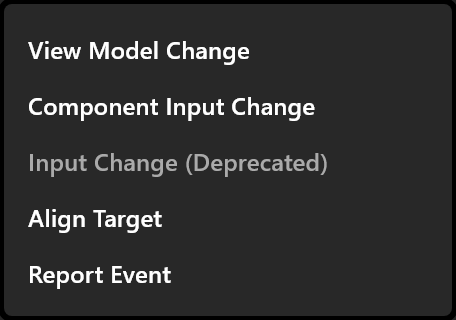
Actions lists what happens, top to bottom. + adds one:
| Action | What it does |
|---|---|
| View Model Change | set a property to a value — set onAir to true. A trigger property is fired instead |
| Component Input Change | Changes an input of a component placed on this artboard |
| Align Target | Moves an object to the pointer: Align picks it. The button beside it keeps its distance from the pointer instead of jumping to it |
| Report Event | Reports one of this artboard's events |
| Input Change (Deprecated) | Sets an Animation States input. For documents made with inputs; use a property instead |
For a true / false property, click the value to cycle true, false and toggle — toggle flips it on every click, which is how an on / off button is made.
Two small buttons follow the value:
- Read the value from a property — the value comes from another property instead of being fixed. Click it again to go back to A fixed value.
- Pick a converter — the value passes through a converter on its way. With none, it reads "Direct value".
× removes an action. Delete listener removes the whole listener.
Testing it
With the Animation States open, the stage sends the pointer to the graphic, whether it is playing or stopped: click the target on the stage and watch the property change in the Data panel. See Listeners and inputs.