Appearance
Converters
Every step a converter can have, what goes in and what comes out, every operation and formula function, and ready-made chains for the things graphics need most.
How to build one is on Converter; what converters are for is on Converters.
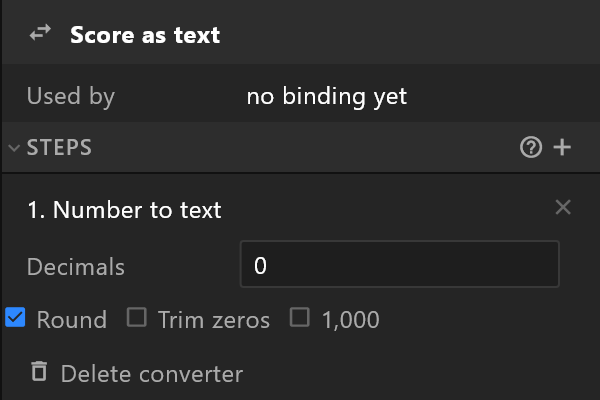
Steps: what goes in, what comes out
A step takes what the step above it gave. Put the steps in an order whose types follow on: a Number to text step hands text to the next step, so a Round after it has nothing to round.
| Step | Takes | Gives |
|---|---|---|
| Number to text | Number | Text |
| Map a range | Number | Number |
| Round | Number | Number |
| Calculate | Number | Number |
| Formula | Number | Number |
| Ease changes (smooth counter) | Number | Number, arriving gradually |
| Degrees to radians | Number, in degrees | Number, in radians |
| Normalize (percent to 0–1) | Number, a percentage | Number, 0–1 |
| Text to number | Text | Number |
| Pad text | Text | Text |
| Trim text | Text | Text |
| Remove trailing zeros | Text | Text |
| Not (negate boolean) | True or false | The opposite |
| Fire trigger on change | Any value | Fires a trigger |
| List length | List | Number |
| Number to list | Number | List of that many items |
Calculate: the operations
Calculate does one sum with the value and a second number: a Constant you type, or another number property.
| Operation | Gives |
|---|---|
| Add | value + number |
| Subtract | value − number |
| Multiply | value × number |
| Divide | value ÷ number |
| Modulo | What is left over after dividing: 7 modulo 3 is 1 |
| Power | value to the power of the number |
| Square root | The square root of the value |
| Exp | e to the power of the value |
| Log | The natural logarithm of the value |
| Cos, Sin, Tan | The cosine, sine or tangent of the value, in radians |
| Acos, Asin, Atan | The angle, in radians, whose cosine, sine or tangent is the value |
Angles are in radians. For an angle in degrees, put a Degrees to radians step first, or multiply by 0.01745 (π ÷ 180).
Formula: operators and functions
A formula is written out of tokens: value, numbers, operators, functions, brackets and commas. Use brackets rather than relying on which operator goes first: (value + 1) × 100 says what it means.
Operators, from + Operator:
| Symbol | Does |
|---|---|
+ - × ÷ | Add, subtract, multiply, divide |
mod | What is left over after dividing |
^ | To the power of |
sqrt exp log | Square root, e to the power of, natural logarithm |
cos sin tan acos asin atan atan2 | Angles, in radians |
round floor ceil | To the nearest whole number, down, up |
Functions, from + Function. Each opens a bracket: close it with + ), and separate values with + ,.
| Function | Gives |
|---|---|
min(a, b) | The smaller of the two |
max(a, b) | The larger |
round(a) floor(a) ceil(a) | To the nearest whole number, down, up |
sqrt(a) | The square root |
pow(a, b) | a to the power of b |
exp(a) log(a) | e to the power of a; the natural logarithm |
cos(a) sin(a) tan(a) | Trigonometry, in radians |
acos(a) asin(a) atan(a) | The angle, in radians |
atan2(y, x) | The angle of the point x, y, in radians |
random( | A random number. Random re-rolls says when it changes: Once, Every frame, or When the source changes |
A number token can read another property instead of a fixed number: its row then reads Property. So value ÷ total × 100 can divide by a total that arrives with the data.
Recipes
| You want | Steps |
|---|---|
12500 shown as 12,500 | Number to text: Decimals 0, 1,000 on |
0.412 shown as 41.2 | Calculate Multiply 100 → Number to text: Decimals 1 |
| A share of a total, as a percentage | Formula value ÷ total × 100 → Number to text |
| A bar as long as a share: 0–1 → 0–400 px | Map a range: in 0 to 1, out 0 to 400, Clamp both |
| A score that counts up | Ease changes (smooth counter) Duration 1 → Number to text Decimals 0 |
7 shown as 07 | Number to text → Pad text: Length 2, Pad with 0 |
3.40 shown as 3.4 | Number to text → Remove trailing zeros, or Trim zeros in Number to text |
A number that arrives as text, "42" | Text to number |
| Show when off is true | Not (negate boolean) |
| How many rows a list has | List length |
| A needle turned by a value in degrees | Nothing: bind it straight to the rotation, which reads degrees |
A percentage as 0–1, 42 → 0.42 | Normalize (percent to 0–1) |
Things to know
- One converter, many bindings. Changing it changes every binding that uses it. For a variation, duplicate it.
- The last step decides the type. A text needs text out of the last step, a width needs a number.
- Deleting a converter leaves its bindings working, showing the value unchanged.
- A bound rotation reads degrees. Binding a number to Rotation puts Degrees to radians on it for you, and the row reads
speed (degrees). For data in radians, untick Value is in degrees in the bind menu. See Inspector. - Degrees to radians (× π/180) and Normalize (percent to 0–1) (× 0.01) show their operation and value, and neither can be changed. For any other fixed sum, Calculate or Formula is the step to use.