Appearance
Monitor out
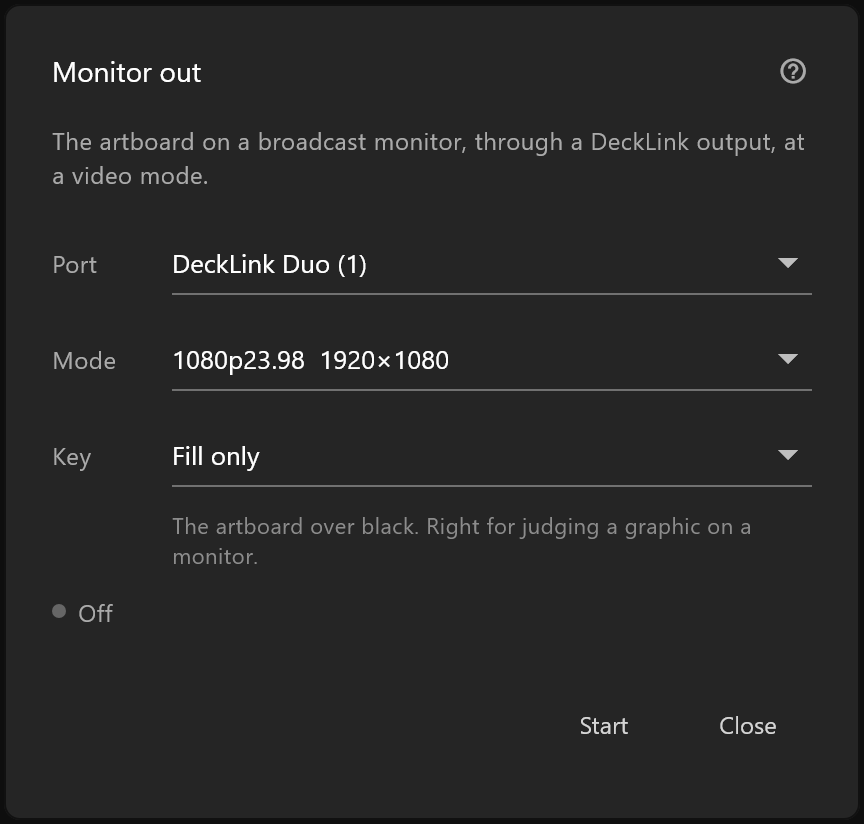
The artboard on a real broadcast monitor, out of a DeckLink card, while you work.
View aids › Monitor out…, or click the chip in the top bar while it is running.
Why use it
A computer screen is not a broadcast monitor. Colours, motion and the way thin strokes hold together look different on the wall in the gallery than they do at your desk, and it is worth knowing which one you are designing for before a graphic goes to air rather than after.
Use it
| Setting | What it is |
|---|---|
| Port | Which DeckLink output to send from |
| Mode | The video mode — size and rate — the monitor expects |
| Key | How the graphic's transparency leaves the card. See the table below |
| Key port | Which port carries the key, with Fill + key on two ports |
| Key | What leaves the card |
|---|---|
| Fill only | The artboard over black. Right for judging a graphic on a monitor |
| Fill + key on two ports | Colour on one port, transparency on the other: what a mixer with a separate key input expects. Needs a second port |
| Keyed on the card, over its own background | The card lays the graphic over the picture arriving at its input, and one signal leaves it |
| Fill and key out of the card's paired sockets | Colour and transparency on the sockets the card pairs, for a mixer to lay over its own picture. This is what a playout server set to an external keyer does |
Choices the port cannot do stay in the list, greyed, and say why: "needs a second port", "this port has no keyer". If your card pairs its connectors, use its own keying rather than two ports.
Start begins sending; Stop ends it. The line above the buttons says how it is: Off, On air to the monitor with the size and rate, or why it cannot start:
| The line reads | What to do |
|---|---|
| … is busy playing out: pick another port | Something else on this machine is sending from it |
| … is in use by another application | Close the other program, or pick another port |
| … is turned off for preview on this machine | Turn it on in the live input dialog's port list, the eye beside it |
| That port is not on this machine any more | The card was removed or renumbered. Pick again |
With no card, the window says "No DeckLink devices found on this machine." and offers only Close.
While it runs
A chip appears in the top bar: a green dot, Monitor out, and the size and rate being sent. Click it to come back here.
If frames reached the card too late to play on time, the chip adds N late in amber. A handful during a heavy edit is ordinary; a number that climbs steadily means the scene is costing more than the machine can give at that rate, and the preflight and performance pages are where to look next.
Key and fill, briefly
A broadcast graphic is two pictures: the fill, which is the artwork, and the key, which says where it is solid and where the picture behind shows through. Some monitors and mixers take both on one port; others want them on two. Key is where you say which.