Appearance
Assets
The fonts, pictures and scripts a document carries inside it, so it plays the same everywhere.
Carried, not linked
When you bring a font or a picture into a document, the document keeps a copy. Send the .airz file to a colleague, or the graphic to the playout server, and the font is there — whether or not that machine has it installed. Nothing points back to a folder on your computer.
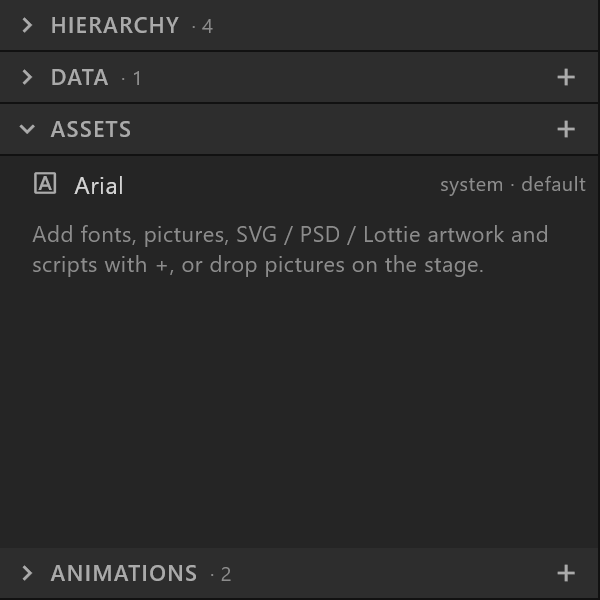
The price is size: a document is as big as what it carries. Large pictures and several weights of a typeface add up; the Assets panel and the asset inspector show what each one costs.
One asset, many uses
A picture used by five objects is carried once. Replace… on the asset swaps the file, and all five change — a new logo in one step.
Kinds
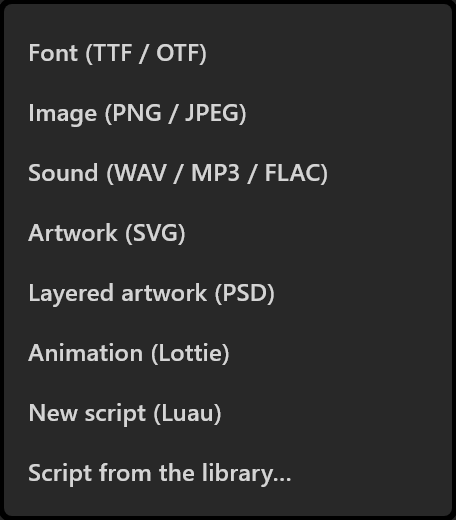
| Asset | Brought in with | Used by |
|---|---|---|
| Font | + › Font (TTF / OTF) | Texts |
| Picture | + › Image, or dropped on the stage | Picture objects |
| Artwork | + › Artwork (SVG), Layered artwork (PSD), Animation (Lottie) | Turned into shapes and layers you can edit |
| Script | + › New script or Script from the library… | Scripted objects |
Fonts and licences
Because a document carries its fonts, copying the document copies the font. Most commercial typefaces allow use inside your own facility, not passing the font on. Preflight and the template card warn when a commercial typeface is embedded — worth reading before a document leaves the building.
Pictures that change on air
A picture asset is fixed. A picture that should change at playout — a guest's photo, a camera, a clip — is a slot the control system fills instead. See Live sources.