Appearance
The controller
The controller is where the operator plays your graphic: it holds it as a template, puts it in a rundown, fills in its fields and takes it to air. This page is what your document becomes there. The controller has a manual of its own for everything else.
How a graphic gets there
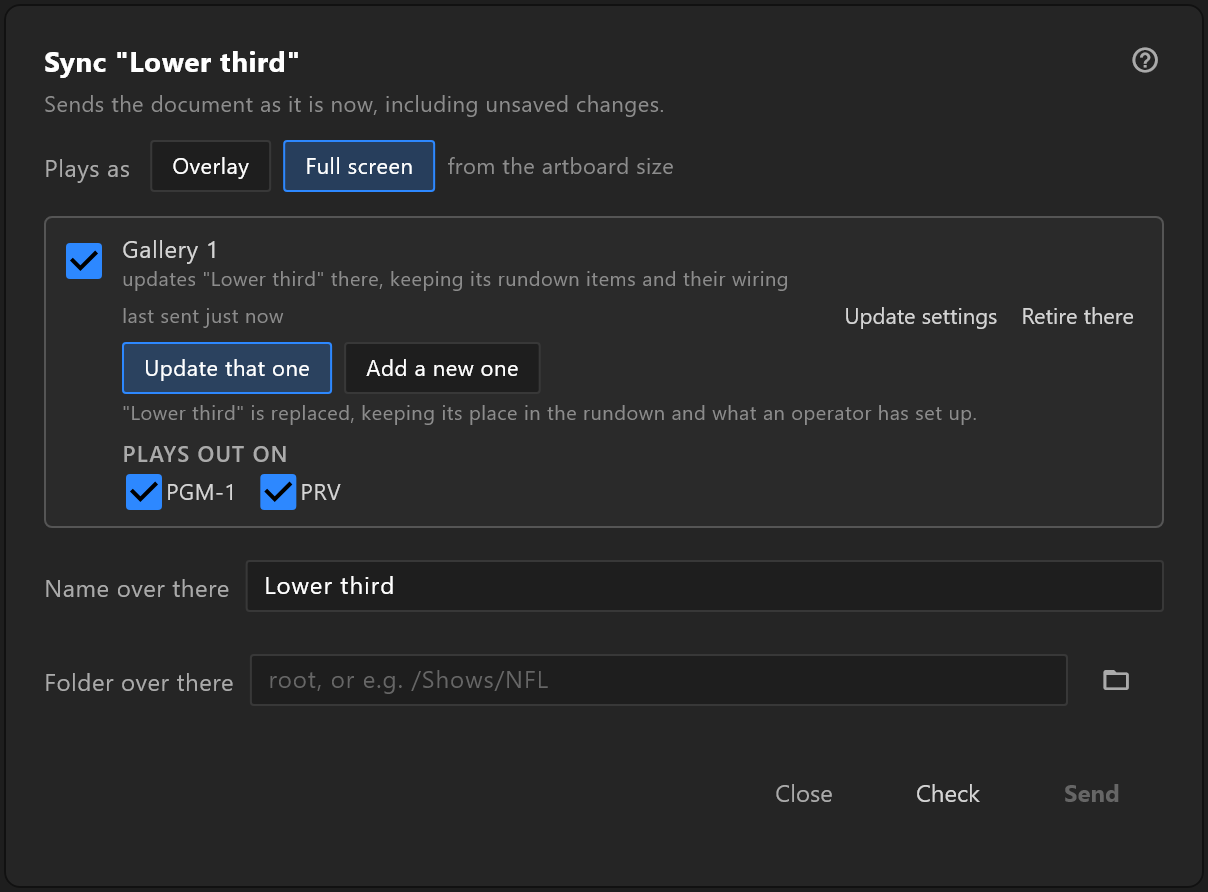
Sync to controllers sends the document as it is now. On the controller it arrives:
- in its library, under the Name over there you gave it, in the Folder over there, created if it is not there yet;
- with a notice to the operator saying where it landed, and which engines it plays out on — or that it has none set there yet;
- ready to play on the engines you ticked under PLAYS OUT ON. With none ticked, the template shows NO ENGINE until the operator chooses one.
Sending it again
Sync the same document again and it replaces the template in place:
- rundown items that use it stay where they are, with their wiring;
- fields that still exist keep the values the operator typed;
- new properties appear as new fields;
- fields for properties you deleted or renamed go.
The controller recognises the document, not its name, so renaming the template or moving its folder does not break the link. Add a new one in the Sync window is for a real second template.
What the operator sees
Each property of the view model becomes a field on the rundown item, grouped by type:
| Group | Properties | The operator gets |
|---|---|---|
| ACTIONS | Triggers | A button with the trigger's name |
| TEXT | Strings | A text field |
| PALETTE | Colours | A colour |
| VALUES | Numbers | A number field |
| STATES | Booleans | A switch |
| ASSETS | Images | A picture from the controller's assets, or a live source |
| VIEW MODELS | Nested view models | One group each, with their properties inside |
- The label is the property's name, as you typed it. That is the reason for naming properties for the operator.
- A new rundown item starts with your values: what the Data panel held when you synced.
- Live slots get a source picker: a DeckLink input and its format for
input1,input2…, a video file forvideo1,video2…. - Enum properties show their value as text. The operator types one of the enum's values, exactly as you wrote it:
Live, notlive. List, Font and Artboard properties do not appear. See Sending values › What each type accepts.
Visible to controller
Unticking Visible to controller leaves a property out of what the sync sends. The controller also reads the graphic itself, and today it lists every property it finds there. To keep a value out of the operator's hands now, give it a name the operator will recognise as internal, and say so in the handover.
Taking it to air
There is no separate Take button for these graphics. The trigger buttons are the take:
- pressing a trigger puts the graphic on air;
- a trigger whose name contains out takes it off.
So a graphic with takeIn and takeOut plays the way an operator expects. See Triggers and events, and keep the word out out of every other trigger's name.
Overlay or full screen
Plays as in the Sync window decides where the graphic sits on the controller's engines:
| Plays as | On air |
|---|---|
| Overlay | Above the camera: lower thirds, bugs, straps, tickers |
| Full screen | Behind everything else: full-frame backgrounds and tables |
Update settings in the Sync window changes it later without sending the graphic again.