Appearance
Controllers
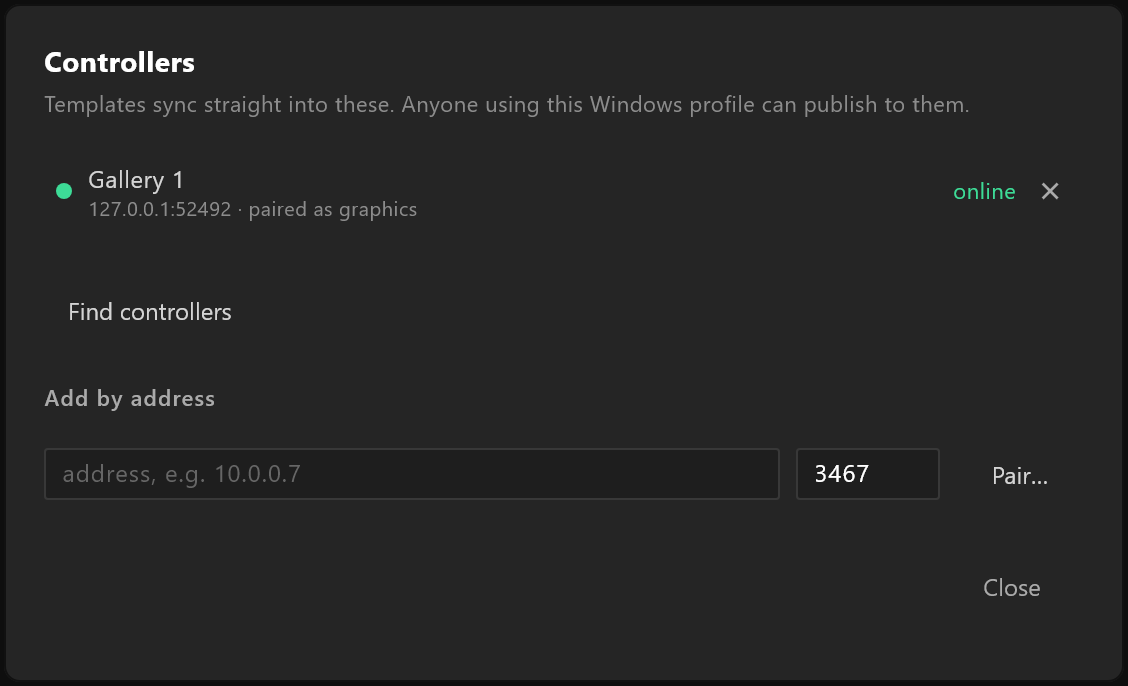
The control rooms this editor can send templates to. Pair with a controller once; after that, Sync to controllers sends to it in a click.
File › Controllers…
What it does
A controller is the machine an operator runs graphics from on air. Pairing tells the editor where it is and gives the editor permission to publish to it. The list belongs to this computer, not to a document: anyone using this Windows profile can publish to the controllers it holds, and the window says so.
The list
Each paired controller shows its name, its address, and the role it was paired as, for example paired as graphics. The dot and the word beside it say how it is:
| Status | What it means |
|---|---|
| online, green | It answered, and publishing will work |
| not answering, grey | It did not answer. Is it on, and on this network? |
| not paired, amber | It answered, but no longer accepts this editor. Pair again appears |
| checking… | The editor is asking |
Click a name to rename it — the name is only for you. × forgets the controller.
Adding one
Find controllers looks on this network. Each controller that answers is listed with Pair… beside it. If none answers, the window says so: "No controllers answered on this network. Add one by address below."
Add by address is for a controller on another network, or one that does not answer the search: type its address, for example 10.0.0.7, and its port (3467 unless its operator changed it), then Pair….
Pairing
Pair… asks for a user name and password on that controller: "Use an admin or graphics account. The password is used once and is not stored." Pair signs in once and keeps the permission it is given, not the password. If the controller refuses, the window says why.