Appearance
Triggers and events
A trigger is a moment the operator causes: take it in, take it out, next page. An event is a moment the graphic announces: took in, finished, goal. Triggers go into the graphic; events come out of it.
Triggers
A trigger is a property of type Trigger in the Data panel (T). It has no value. It fires, and a Animation States transition waiting for it moves on.

In the editor, Fire fires it in Animate mode, while the Animation States play. On air, the operator's controller fires it by name.
Taking a graphic in and out
The usual pair. The controller has no fixed names; it goes by the word out:
| Trigger | What the Animation States do | On the controller |
|---|---|---|
takeIn | Idle → In: the graphic animates on, then holds | Fires it, and marks the graphic on air |
takeOut | Hold → Out: it animates off | Fires it, and marks the graphic off air |
Every trigger of the graphic appears on its rundown card as a button with the trigger's name. Pressing any of them puts the graphic on air. A trigger whose name contains out — takeOut, out, animateOut — also takes it off air.
Keep "out" for the way out
The controller reads out anywhere in a trigger's name, in any case. A trigger called layout, timeout or shoutOut would take the graphic off air on the controller while the graphic itself carries on. Name those arrange, timer or highlight.
To build the Animation States, see Animate with Animation States.
A graphic with pages
For a graphic that steps through pages — a results table, one row after another — add a trigger named next to the view model, and have each transition from one page to the next wait for it. The playout server's Next command fires it.
Next looks for a view-model trigger next first, then for a trigger input next on the Animation States, so graphics built either way work.
Firing from data
A control system can fire a trigger with a value of true, along with other values in the same message: new names first, then the take. See Sending values from airZ Engine.
Waiting for the take
airZ Engine can load a graphic ready, showing nothing, and bring it on the moment its trigger fires. Design for it:
- The first state after Entry shows nothing: everything off-screen or transparent at the first frame of In, or an empty Idle state.
- The take trigger's name is exactly the one the operator's rundown fires. A trigger name that matches nothing reveals nothing, so a typing mistake leaves the channel empty rather than showing a half-built graphic.
Events
An event is a named moment the graphic reports, with values if you give it some: tookIn, goal with the scorer's name. It is reported from a timeline key, when a state is entered, or by a listener.
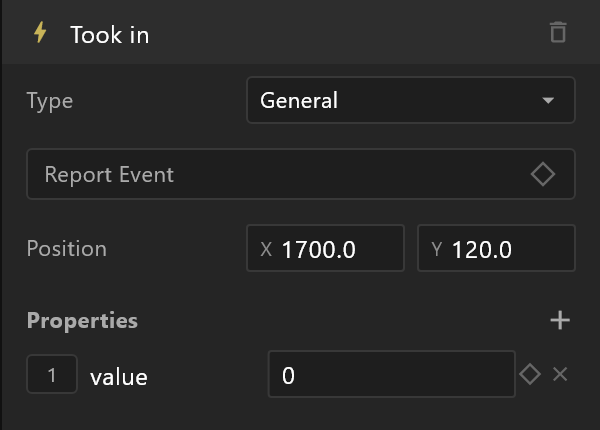
Inside the graphic, a listener set to Listen to: Event reacts to it. This is how a component tells the artboard around it that something happened.
Outside the graphic, events are listed in the bindings.json written with the export, with their properties, for players that act on them. airZ Engine plays the graphic and does not send its events on to the controller. For a moment the operator must see — "the clock has stopped" — show it in the graphic itself.