Appearance
Converters
A converter changes a value on its way from the data to what it shows: the right number of decimals, a percentage, a score that counts up.
Why
Data arrives as it is kept, not as it should look. A vote share arrives as 0.4273; the graphic wants 42.7%. A score jumps from 12 to 15; the graphic wants it to roll. A switch says true; the graphic wants the opposite.
A converter sits between the property and the thing it drives, and turns one into the other. The data stays as it is: the same property can drive one text through a converter and another text without.
Steps
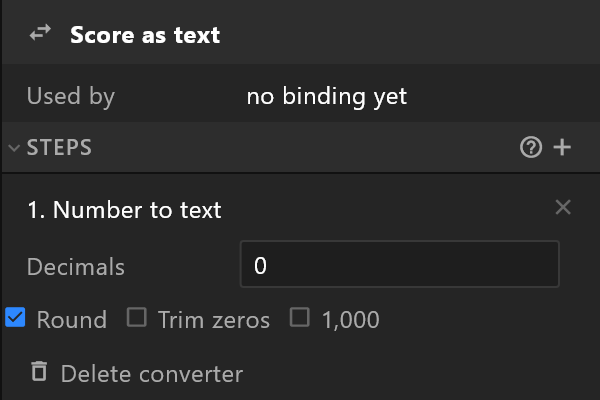
A converter is a list of steps, applied in order: the output of one is the input of the next. 0.4273 → Calculate × 100 → Round to one decimal → Number to text gives 42.7; add the % in the text itself.
Useful steps:
| Step | Turns | Into |
|---|---|---|
| Number to text | 12500 | 12,500, with the decimals you choose |
| Map a range | 0–1 | 0–100, or 0–360 for an angle |
| Ease changes (smooth counter) | a jump from 12 to 15 | a count up over the time you set |
| Pad text | 7 | 07 |
| Not | true | false |
| Formula | anything | whatever you write: value × 100 |
Every step and its settings: Converter.
One converter, many uses
A converter lives in the document, listed in the Data panel, and any binding can use it. Change it once — two decimals instead of one — and every number that runs through it follows. Name them for what they do: "Percent, one decimal", "Score counter".