Appearance
Preflight report
The list of what would export happily and then misbehave on air, one click from each thing it is about.
Click the preflight chip in the top bar. The report takes the place of the inspector; × closes it, and so does clicking the chip again.
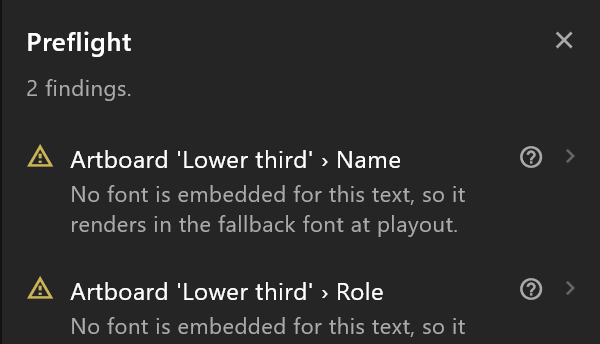
What it shows
The first line counts: "2 findings.", or "5 findings, 1 of them serious.", or "Nothing to fix. Every check passed."
Each finding has:
| Part | What it tells you |
|---|---|
| The icon | Red: serious — the graphic is likely to go to air wrong. Amber: worth knowing |
| The first line | Where it is: the artboard, then the object, timeline or Animation States |
| The second line | What is wrong, in a sentence |
Serious findings are listed first; each kind keeps the order it was found in.
Use it
Click a finding. The editor takes you to what it is about — its artboard, then the thing itself, selected — and the report stays open, so the next finding is one click away. Fix it, and the finding disappears from the list as soon as it no longer applies.
Every message, and what to do about each, is in Preflight findings.
See also
- Preflight, the chip
- Prepare a scene for air