Appearance
Graphics Hubs
The Graphics Hubs this computer trusts. A Hub keeps your organisation's templates. You check a Hub's fingerprint once, then each person signs in once on this computer.
File › Graphics Hubs…, just under Controllers…
What it does
A Graphics Hub is the server where your organisation keeps its templates. This window connects this computer to one: it finds the Hub, checks that it really is your Hub, and signs you in.
The list belongs to this computer, not to a document.
The list
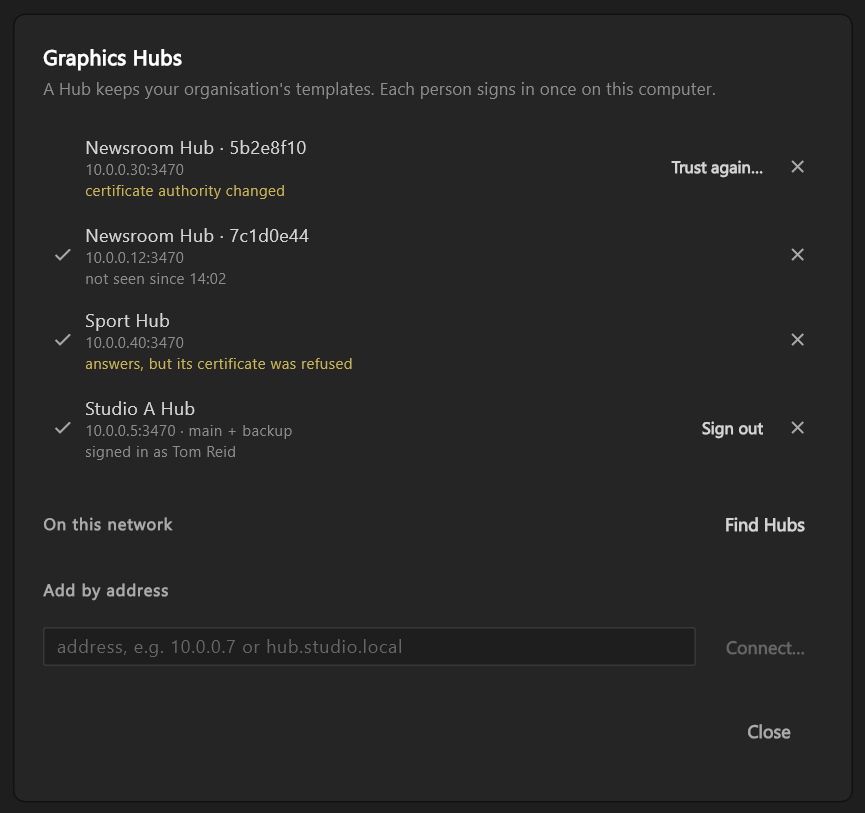
Each Hub this computer trusts has a row. A tick in front of the row marks the Hub as Trusted.
- The first line is the Hub's name. Two Hubs with the same name each add a short code to tell them apart, for example
Newsroom Hub · 7c1d0e44. - The second line gives the address it answered at. If the Hub answered, it also says what answered: main + backup, main, or backup only when only the Hub's backup machine is answering.
- The third line says how the Hub is, when there is something to say. Once you are signed in, it also says who you are signed in as.
| It says | What it means |
|---|---|
| checking… | The editor is asking |
| not seen since 14:02 | It did not answer. Is it on, and on this network? not seen yet if it has never answered |
| certificate authority changed, amber | Something at that address answered with another identity. Nothing was sent. Trust again… appears |
| answers, but its certificate…, amber | The Hub answers and trust still holds, but its certificate was refused. See A refused certificate |
| trust record changed on this computer, amber | What this computer holds about the Hub no longer reads as it was saved. Trust again… appears |
| now a different Hub | Another Hub now answers at every address this one had |
The buttons on a row:
- Sign in… appears once the Hub's main machine answers. While only its backup answers, wait: sign-in needs the main.
- Sign out appears when you are signed in.
- Trust again… appears after a changed authority or a changed trust record. It runs the first connect again, so you check the fingerprint afresh.
- × (Forget this Hub) asks first: "To use it again you'll check its fingerprint and sign in again." Forget removes the Hub and your sign-in.
A refused certificate
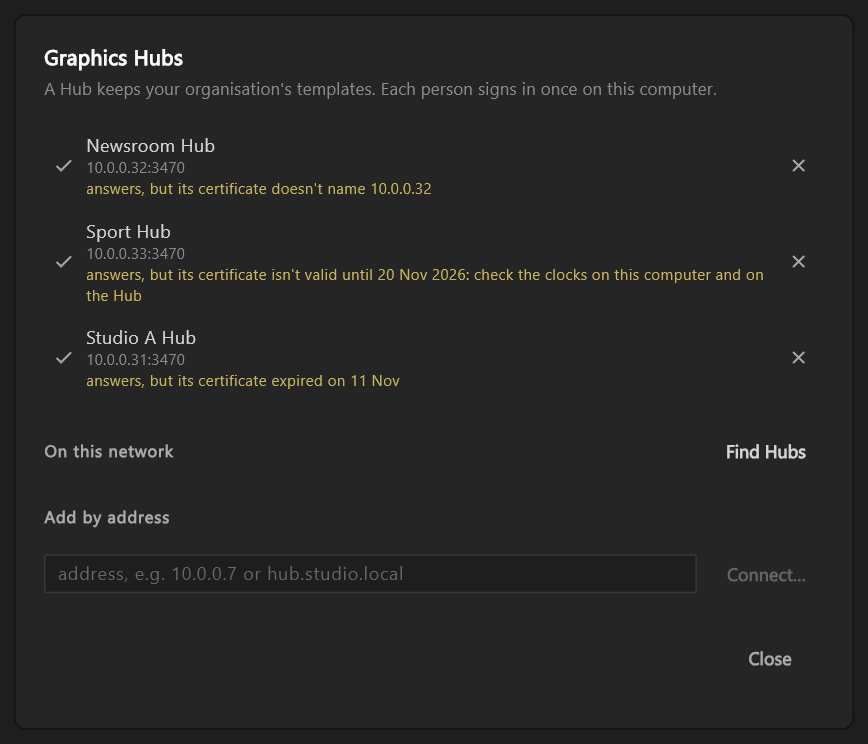
A Hub whose certificate is refused still answers, and it keeps its tick: trust holds. The row says why in amber, with no button, and its tooltip says what to do:
| The row says | What to do |
|---|---|
| answers, but its certificate expired on 11 Nov | Nothing here. The Hub's engineers need to renew its certificate |
| answers, but its certificate doesn't name 10.0.0.32 | Nothing here. The Hub's engineers need to fix its certificate for that address |
| answers, but its certificate isn't valid until 20 Nov 2026: check the clocks on this computer and on the Hub | Check this computer's date. If it is wrong, set it right and the Hub connects. If it is right, the Hub's clock was ahead when it got its certificate: ask its engineers |
| answers, but its certificate was refused | The cause is not known. Ask the Hub's engineers |
A changed certificate authority
If a trusted Hub answers with a different certificate authority, the window says so the first time it meets it. It names the Hub and shows both fingerprints, Trusted before and Now: "This Hub's certificate authority has changed. Nothing was sent. Check with your engineers before trusting it again."
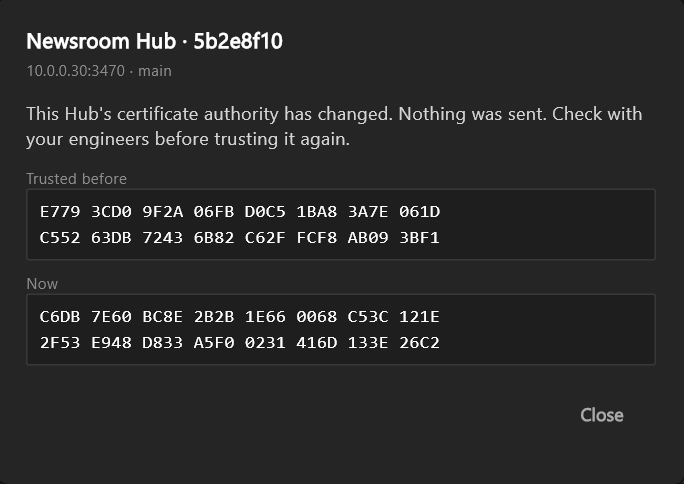
Close leaves the Hub as it is, without its tick. Use Trust again… only once your engineers say the change is theirs.
Adding one
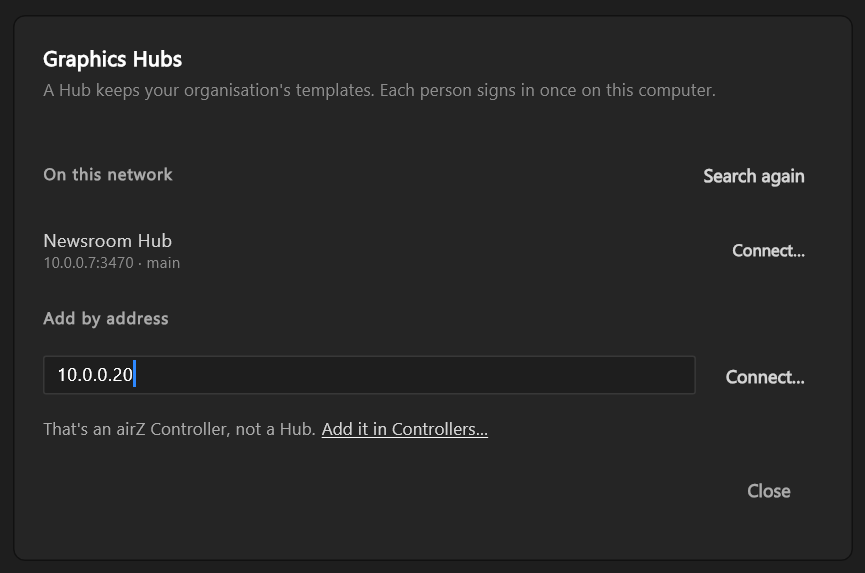
On this network: Find Hubs looks on this network. Each Hub that answers is listed with its address and Connect… beside it. The button then reads Search again. If none answers, the window says so: "No Hub answered on this network. Add one by address."
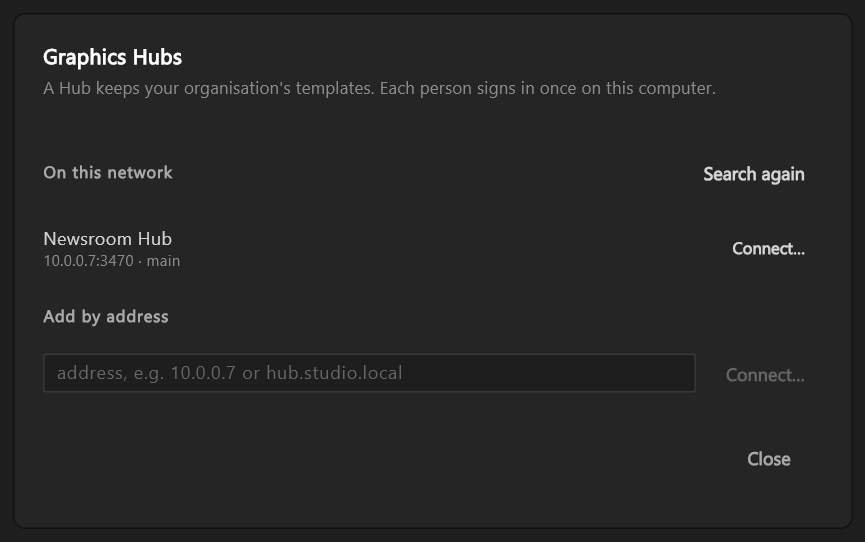
Add by address is for a Hub on another network, or one that does not answer the search. Type its address, a name or a number such as 10.0.0.7, then Connect…. Add :port only when the Hub does not use port 3470. If the address is not a Hub you can use, the window says why and keeps what you typed:
- "Nothing answered at that address. Check it, and that the Hub is running."
- "That isn't a Graphics Hub."
- "That Graphics Hub isn't set up yet. Finish its setup on the Hub's page first."
- "That's an airZ Controller, not a Hub." Add it in Controllers… closes this window and opens Controllers with the address filled in.
The first connect
Connect… asks you to check the Hub's fingerprint before anything is trusted. The fingerprint shows in two lines of eight groups, as the Hub's own Settings page shows it. The last group is hidden.
- Open the Hub's Settings page, or ask whoever runs the Hub to read it to you.
- Check that the groups shown match the ones on that page.
- Type the last four characters, as the Hub's page shows them. When they match, the hidden group appears and Trust this Hub can be pressed. If they do not: "That doesn't match this Hub's fingerprint."
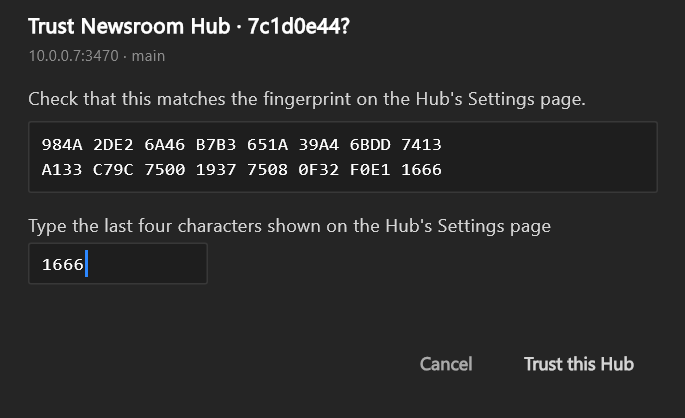
No key on its own trusts a Hub: Enter does not press Trust this Hub. Cancel trusts nothing.
Signing in
Sign in… on a trusted Hub's row asks for three things:
- User name: your user name on that Hub.
- Password: Caps Lock is pointed out while it is on.
- This computer, as the Hub will list it: filled in for you, for example
treid's GFX-3. Change it if your organisation names computers another way.
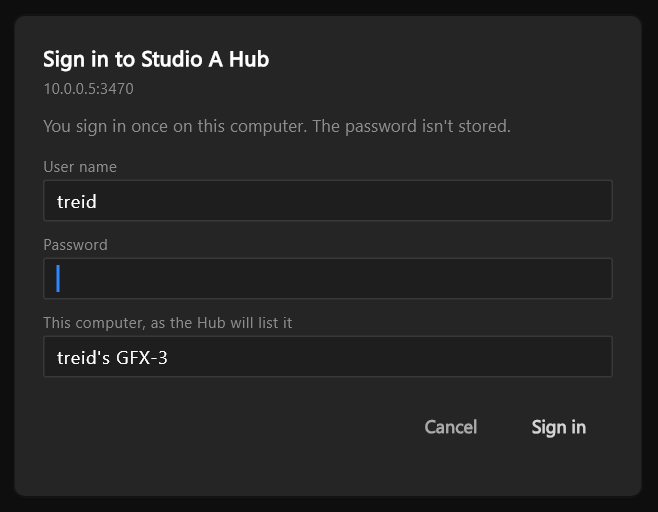
You sign in once on this computer. The password is used once and not stored. If the Hub refuses, the dialog says why under the field or above the buttons:
| It says | What to do |
|---|---|
| "That user name and password don't match." | Type them again |
| "Too many tries. Try again in 4 min." | Wait; the time counts down, and Sign in works again when it ends |
| "Change your password on the Hub's page first, then sign in here." | Change it on the Hub's own page, then sign in |
| "The main Hub isn't answering; sign in when it is." | Only the backup answers. Try again once the main is back |
| "The Hub isn't answering. Try again in a moment." | It stopped answering |
| "The Hub's certificate was refused. Nothing was sent. Open Graphics Hubs… to see why." | The row says what is wrong |
If your password is changed on the Hub, or this computer is removed from the Hub's list, you are signed out here. The dialog says which when you next sign in: "Your password was changed. Sign in again on this computer." or "This computer was removed from the Hub. Sign in to use it again."