Appearance
airZ Player
airZ Player plays a playout graphic on its own, so you can check what you export, or what someone sends you, without opening it as a document.
Opening a graphic in airZ Player
Double-click an .airzplay file in File Explorer. airZ Player opens it in its own window, titled <file> — airZ Player, and starts playing. A .riv opens the same way, and so does a playout graphic named on the command line.
airZ Player needs no licence: it plays the graphic and changes nothing in the file. To open the graphic as a document instead, use File › Import playout graphic… in airZ Editor, or Edit a copy in the player.
The bar

The bar shows the file's name, then the artboard that plays and its size.
| Control | What it does |
|---|---|
| Restart | Plays the graphic again from the start. A graphic that waits for its trigger is started again |
| Pause / Play | Stops the graphic where it is, and carries on from there |
| Edit a copy | Opens the graphic in airZ Editor as a new, untitled document, the same as File › Import playout graphic…. The file you opened stays as it is |
A graphic that waits for its trigger
Most broadcast graphics wait, hidden, for a trigger before they come on: an in the operator fires. airZ Player fires that trigger once when the graphic opens, so you see it come on without looking for the button, and the bar says so: Started with its trigger 'in'.
It fires a trigger only when the graphic is waiting for one at its very start. A graphic that plays by itself is left alone, and a graphic that has come on and waits for its out is never taken off.
The side panel
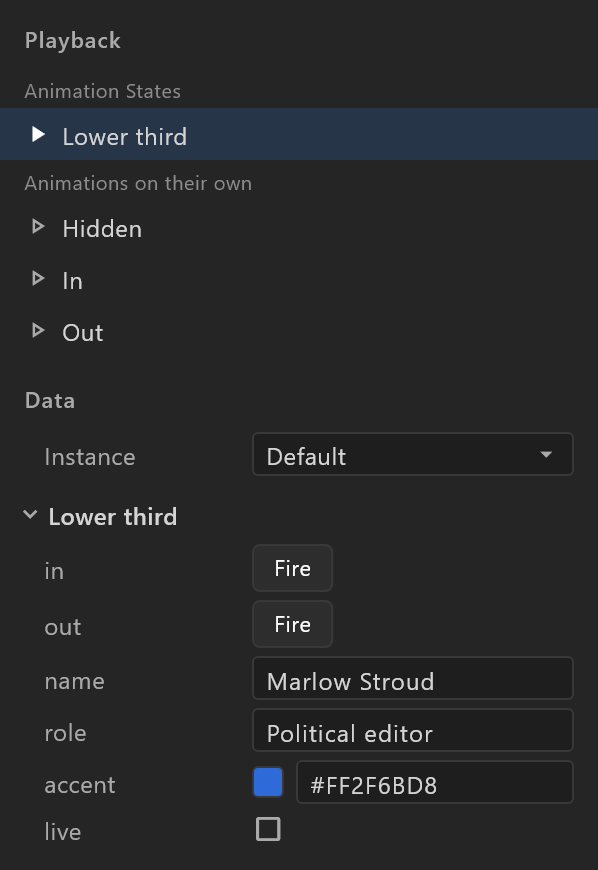
Playback
| Row | What it does |
|---|---|
| Animation States | The graphic's Animation States. The one that plays is marked; pick another to play that instead |
| Animations on their own | Each timeline. Pick one to play it alone, without the Animation States, to check a single move |
Data
The values the graphic takes, the same ones the operator sets on air. Change one and the graphic follows at once; a value the graphic changes itself is read back while it plays.
| Row | What it is |
|---|---|
| Instance | Which set of values the graphic shows. There only when it has more than one; names that repeat are numbered: Final, Final 2 |
| Text, number | Type a new value |
| Yes/no | A checkbox |
| Colour | A swatch and its value, such as #FF2F6BD8: type a new one |
| Choice | A menu of the enum's values |
| Trigger | Fire fires it, as the operator's button does |
| Picture | Picture, set at playout: a picture or a live source is chosen on air, not here |
Nested values are grouped under their name, such as home · Team · Lions, and the items of a list read 1 · Ada, 2 · Ben. A graphic with no values says This graphic has no data to set.
Inputs
Older graphics are driven by inputs of the Animation States rather than by data. Their inputs are listed here: Fire for a trigger, a checkbox or a number for the others.