
How does a broadcast ticker work?
A ticker that never stops, fed by your whole newsroom.
With airZStudio your ticker runs 24/7: journalists send headlines from their own browser, editors approve them, and each one joins the ticker on air without stopping it. Breaking news takes over with one press, and a second press hands back to where the ticker left off. It runs on airZ Editor, airZ Controller and airZ Engine.
What airZStudio offers your newsroom
- One ticker desk, 24/7. Write, correct, reorder and remove headlines on air from airZ Controller.
- The whole newsroom, from the browser. Journalists manage ticker items from their own browser, each according to their role, and items an editor approves join the ticker while it runs. No software to install on their desks.
- Changes without interruptions. New and corrected headlines reach the ticker while it runs. Viewers never see it stop or start again.
- A smooth scroll, measured. The ticker moves by the same step every picture, field by field on interlaced channels, with no late frames in ten-minute runs through SDI.
- Breaking news in one press. The breaking band takes over at once and hands back to where the ticker left off.
- Editorial control built in. Writers submit, editors approve, operators run the ticker: every headline on air was put there by someone whose role allows it.
- Ready on day one. Two ticker designs come with airZ Editor, a scrolling ticker with breaking news and a category ticker, or your own design in your channel's look.
What does a 24/7 news ticker look like on air?
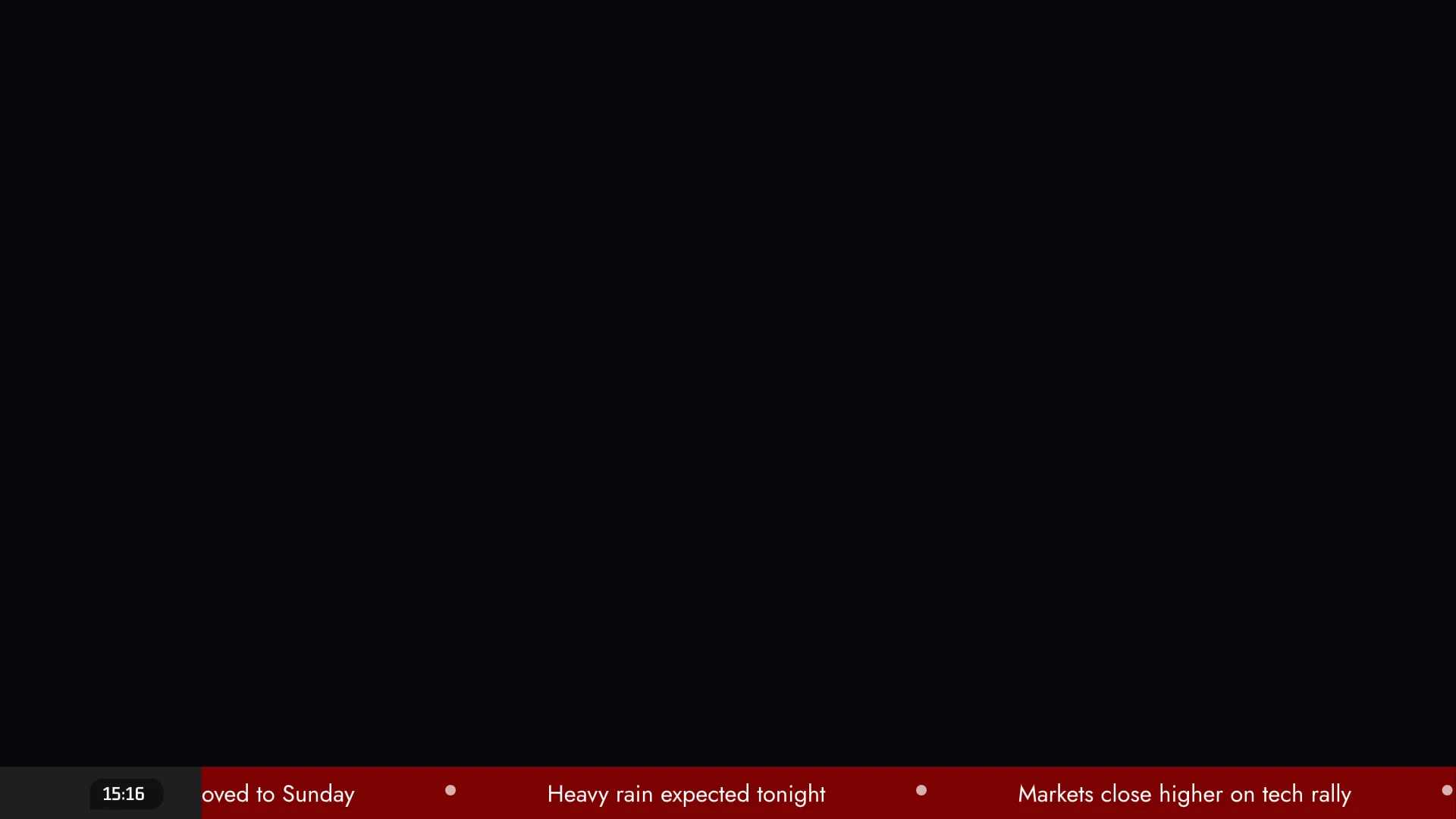
On-air loop
Not a web page or a video: this is the native .airzplay graphic airZ Engine plays on air, exported from airZ Editor and running in your browser on the airZ Player for the web. What you see here is what goes to air. It plays with the same list the ticker desk sends to air: add a headline and it joins the end of the loop, take one off and it leaves the loop, take breaking news and hand back. Nothing already on screen jumps. Third-party licences
A news channel's ticker is on air around the clock. All the while, the desk adds headlines, fixes a typo, moves the lead story to the front and drops what is stale, without asking anyone to stop the graphic. Then something breaks: one press puts the breaking band on air, and when it is over the regular loop carries on from the headline that was on screen. The audience sees none of the editing, only the news, and the people running it do it all from one window.
Crawl, scrolling or category: which ticker?
| Crawl | Scrolling | Category | |
|---|---|---|---|
| What moves | One headline at a time; the next follows by itself | Every headline in the loop, along the bar together | One category's headlines at a time, then the next category |
| Best for | Short, high-priority lines | A long running loop | Channels with sections: news, sport, weather, travel |
| Look | Headline by headline | Headlines with a separator between them | A coloured box names the category; marks in its colour |
| Moves on | By itself | Continuously | After a set number of passes, 1 to 99 |
Why must a ticker never jump?
Viewers read a ticker out of the corner of their eye. An even, linear movement reads as steady; a stutter, a restart or a headline that changes size under the eye pulls attention away from the programme. So every change joins without disturbing what is already on screen: a new headline joins the end of the loop, and a corrected or moved headline takes its new text or place with the next UPDATE. Breaking news is the one deliberate interruption, and it hands back to exactly where the ticker was.
Why do tickers judder, and how does airZ Engine keep the scroll smooth?
A juddering ticker is one of the most visible faults on air. It happens when the text does not move by the same amount from one picture to the next: the position follows the computer's clock instead of the channel's pictures, the text snaps to whole pixels so slow speeds move in uneven steps, an interlaced channel moves the text only once per frame instead of once per field, a frame arrives late, or a change to the headlines makes the band lay itself out again.
airZ Engine removes each of these causes:
- The same step every picture. The ticker moves by its speed times one picture's duration, counted in the channel's own pictures, never the computer's clock. With house reference connected, the output is genlocked, so the ticker is too.
- Smooth at any speed. Text is drawn as anti-aliased outlines at fractional positions, so a speed that is not a whole number of pixels per picture is still perfectly even.
- Every field on interlaced channels. On 1080i50 each field is drawn as its own moment: the ticker moves 50 times a second, not 25.
- Changes that move nothing. When the desk adds, corrects, moves or removes a headline, only that headline changes. The ones already on screen keep their place.
Measured through SDI, in ten-minute runs at 1080p59.94 and 1080i50 with a 3D scene running on another layer: no late or dropped frames, and a scroll step steady to within a tenth of a pixel. Adding, correcting, moving and removing headlines while the ticker ran shifted nothing on screen by more than the measurement's own noise.
Two conditions keep it that way on your air, as with any playout. The channel needs headroom: a frame that arrives late shows in a ticker first, as a repeated or doubled step. And whatever shows the picture should run at the channel's rate: a 60 Hz monitor showing a 50 Hz channel, or a receiver on its own clock, adds judder of its own.
Who writes the ticker?
A ticker is editorial copy, so airZ Controller keeps writing and broadcasting apart. Each account has a role:
| Role | What it may do |
|---|---|
| Ticker writer | Submits ticker copy for approval. Never puts anything on air |
| Ticker editor | Approves copy and decides what is in the on-air loop |
| Operator | Runs the ticker, without changing its on-air loop |
Copy is written in airZ Controller's Ticker window in the gallery, where the category ticker is run and approvals can be done too, or from any browser on the newsroom's network through airZ Controller's web rundown (step 3 below). Either way, a ticker is never filled from a database or a feed: every headline on air was put there by someone whose role allows it.
How does a ticker run in airZ Editor, airZ Controller and airZ Engine?
1. The ticker graphic, in airZ Editor
airZ Editor's Start screen has two tickers ready to use: Scrolling ticker with breaking news, a continuous ticker beside a clock where headlines can be added, edited, reordered or removed on air without anything on screen moving, and Category ticker, which plays its headlines category by category with a coloured box naming each. Or build your own from a list: a headline artboard, a list property, an artboard list in a row, and a looping timeline at an even speed. See Build a ticker from a list.
2. The ticker desk, in airZ Controller
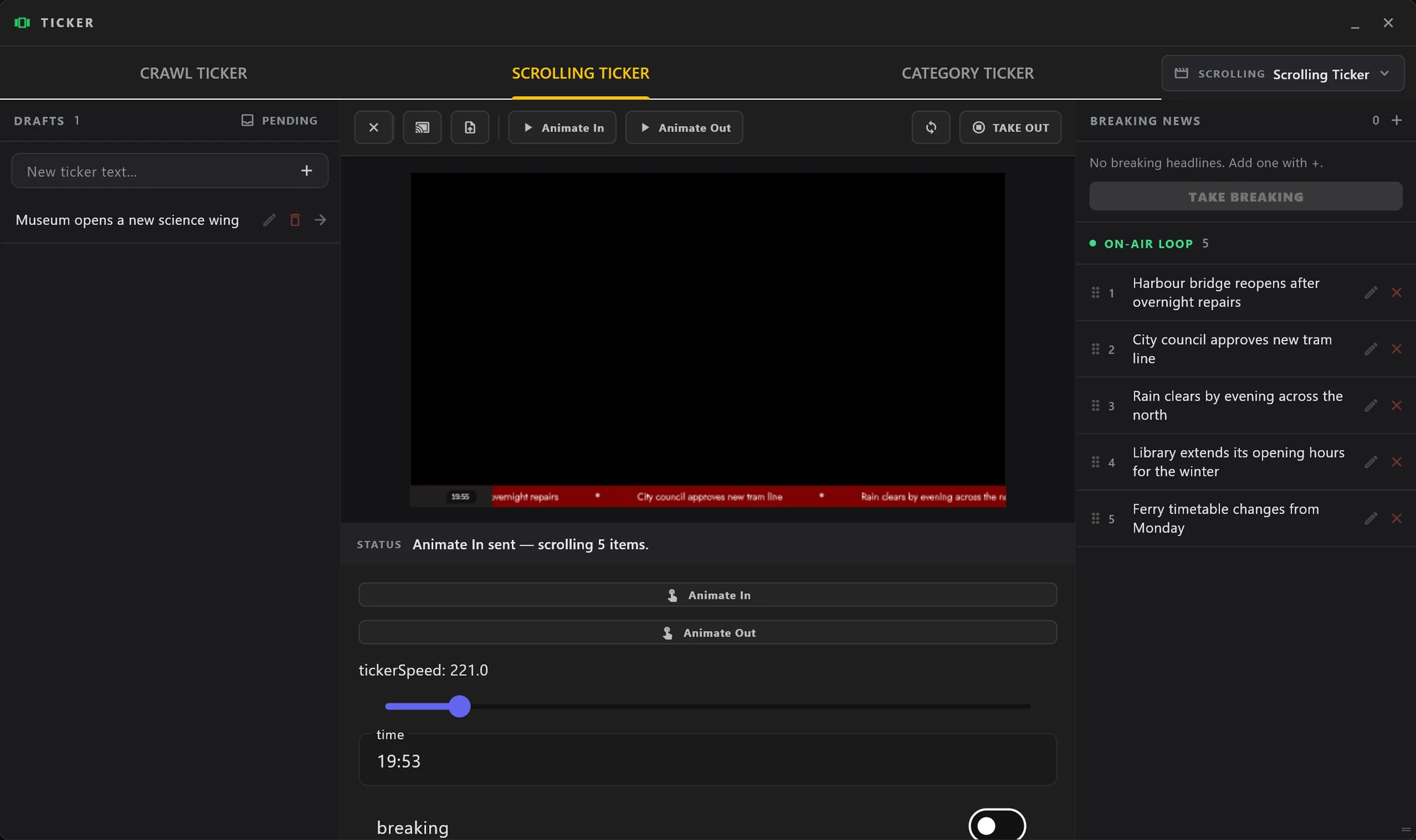
The Ticker window has a tab for each kind. Headlines start as DRAFTS: the arrow sends one to the end of the ON-AIR LOOP, the handle drags it to a new place, the pencil edits it and the × takes it back to the drafts. The ticker goes to air with the load button and the template's own in trigger, changes follow with the update button (point at a button to see its name), and take out takes it off. Closing the window leaves the ticker on air.
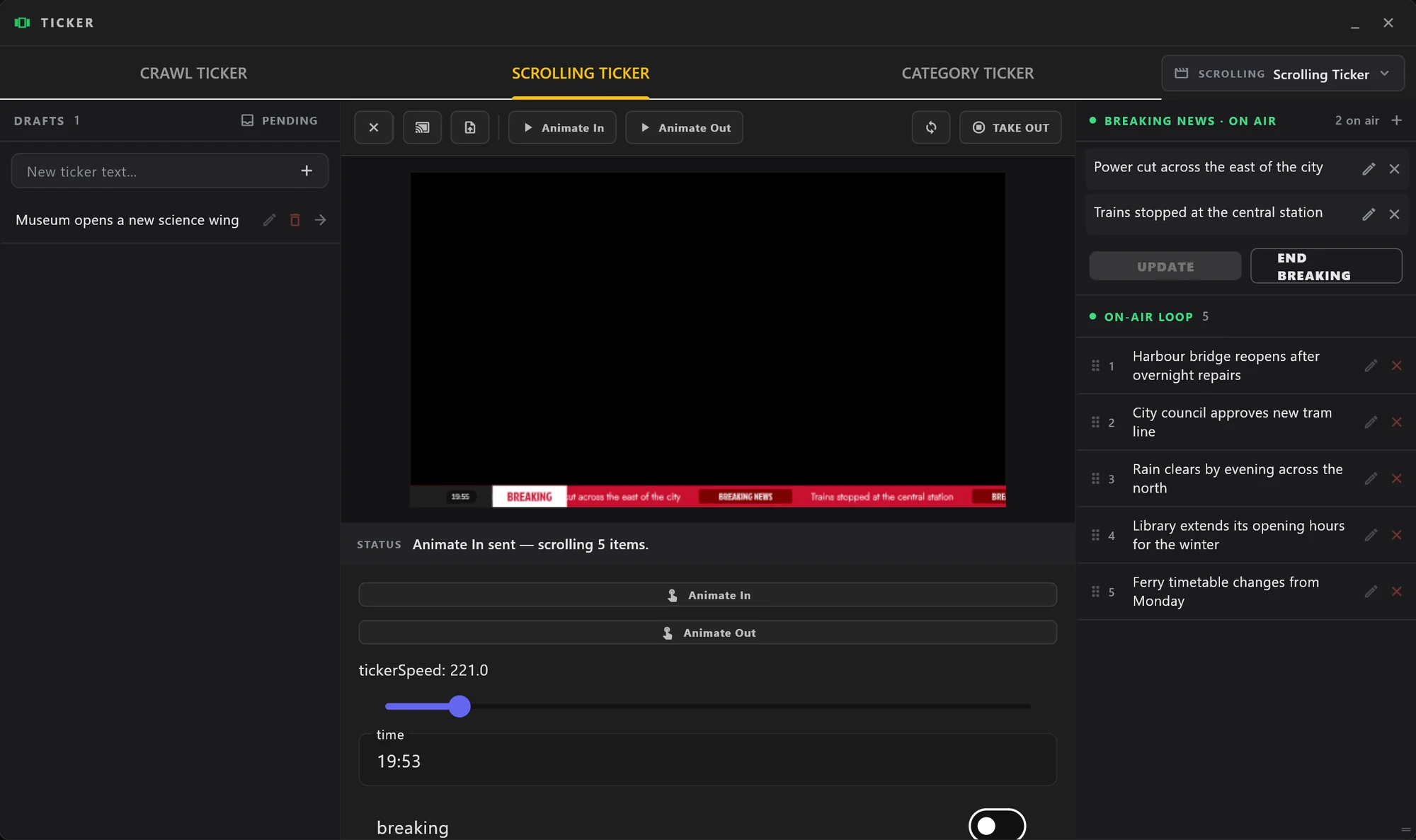
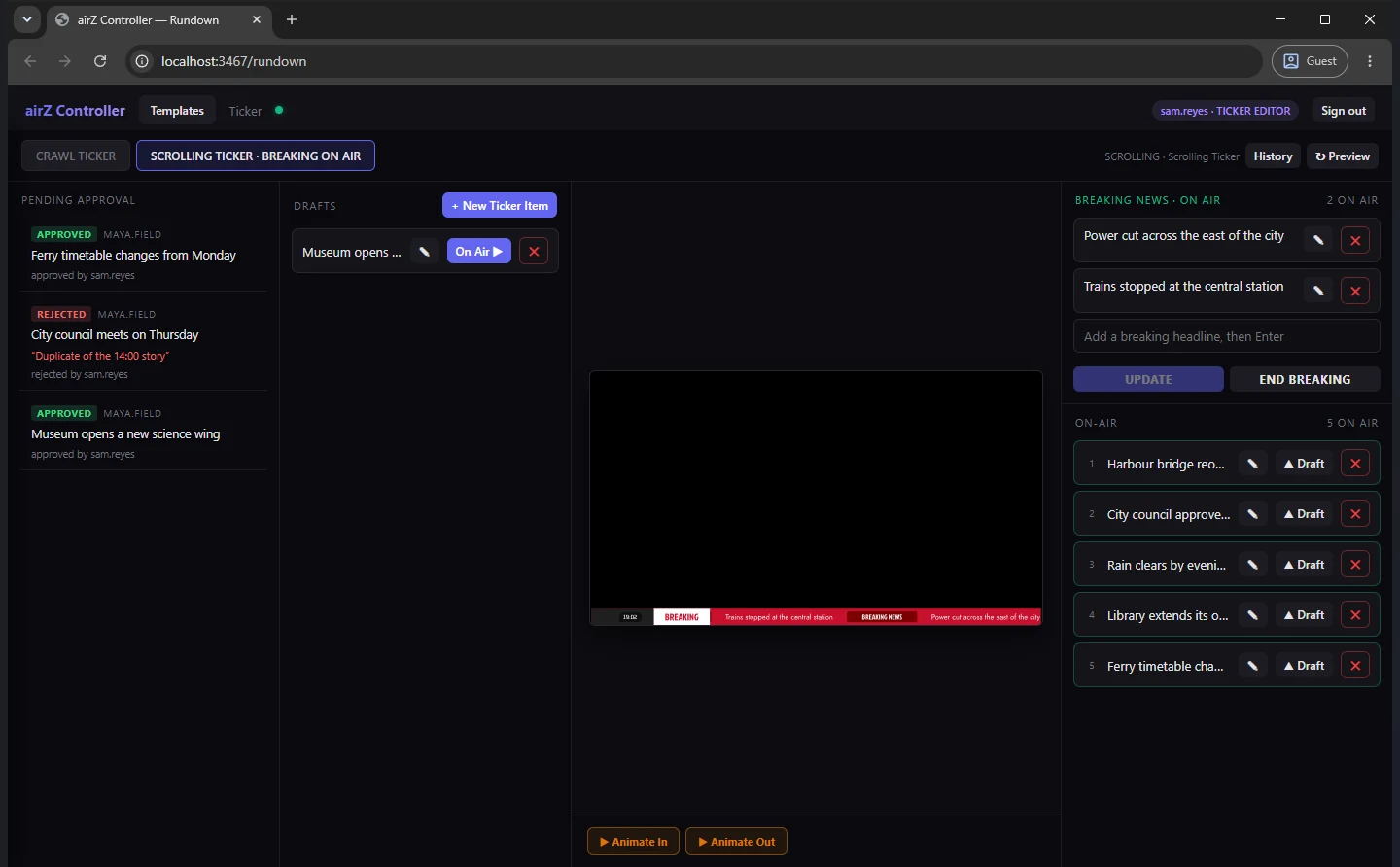
Breaking news has its own list. Add the headlines with +, press TAKE BREAKING, and the breaking band wipes in with only those headlines scrolling. END BREAKING wipes it back and the regular loop resumes. The breaking headlines are kept for the next time.
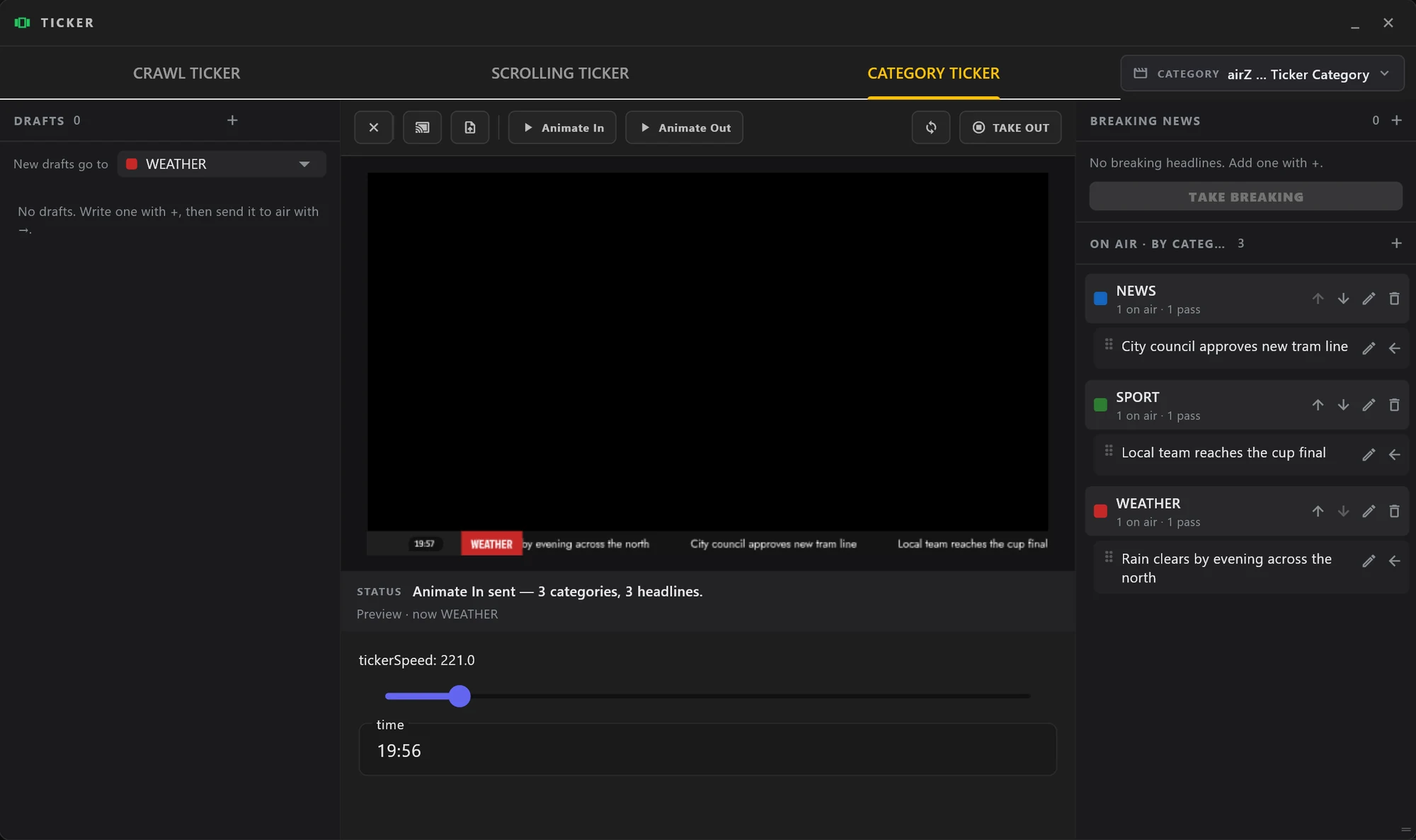
On the Category tab each category has a name shown in the box, a colour for the box and the marks, and how many times its headlines pass before the next category takes over.
3. From the newsroom's browser, in airZ Controller's web rundown
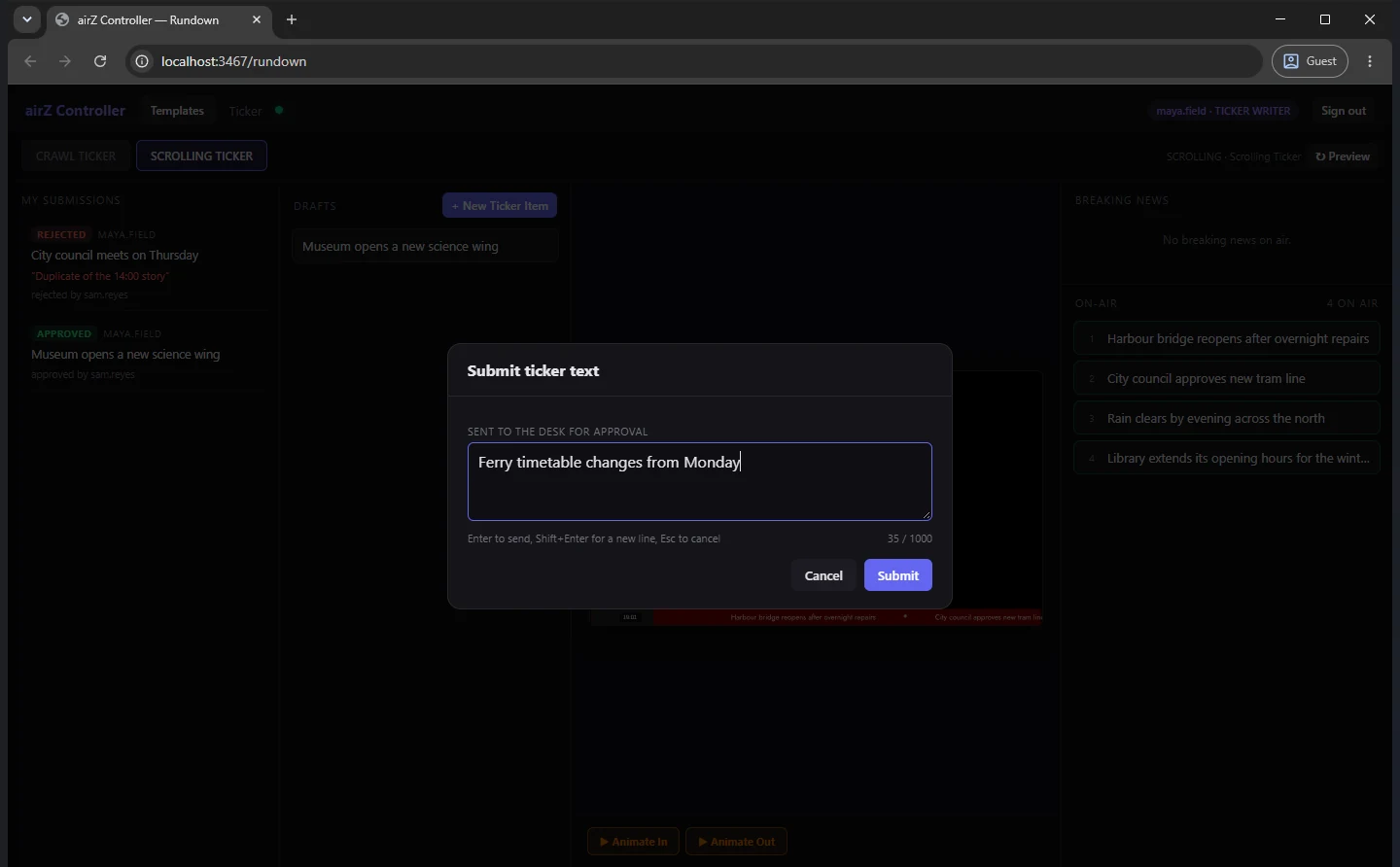
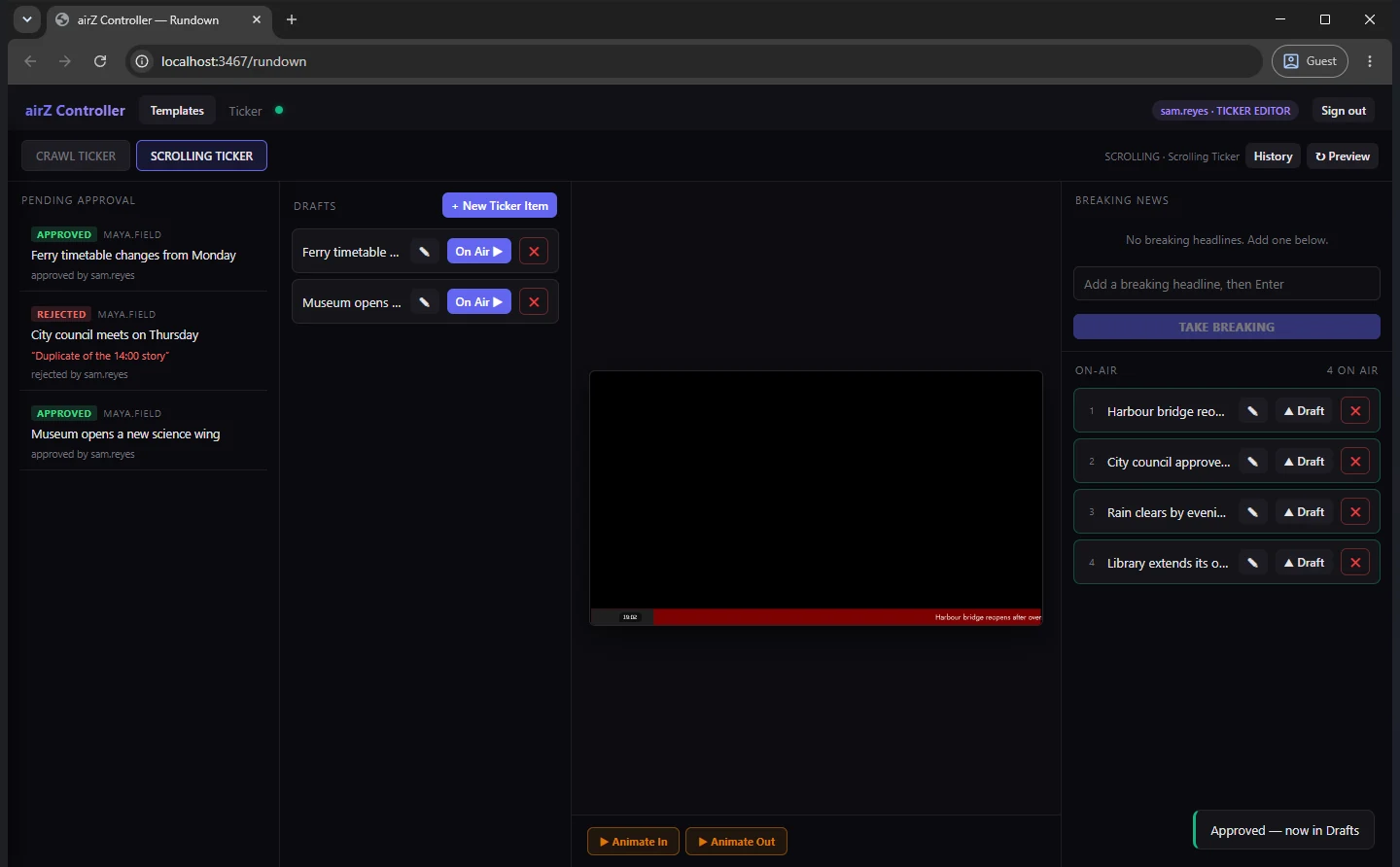
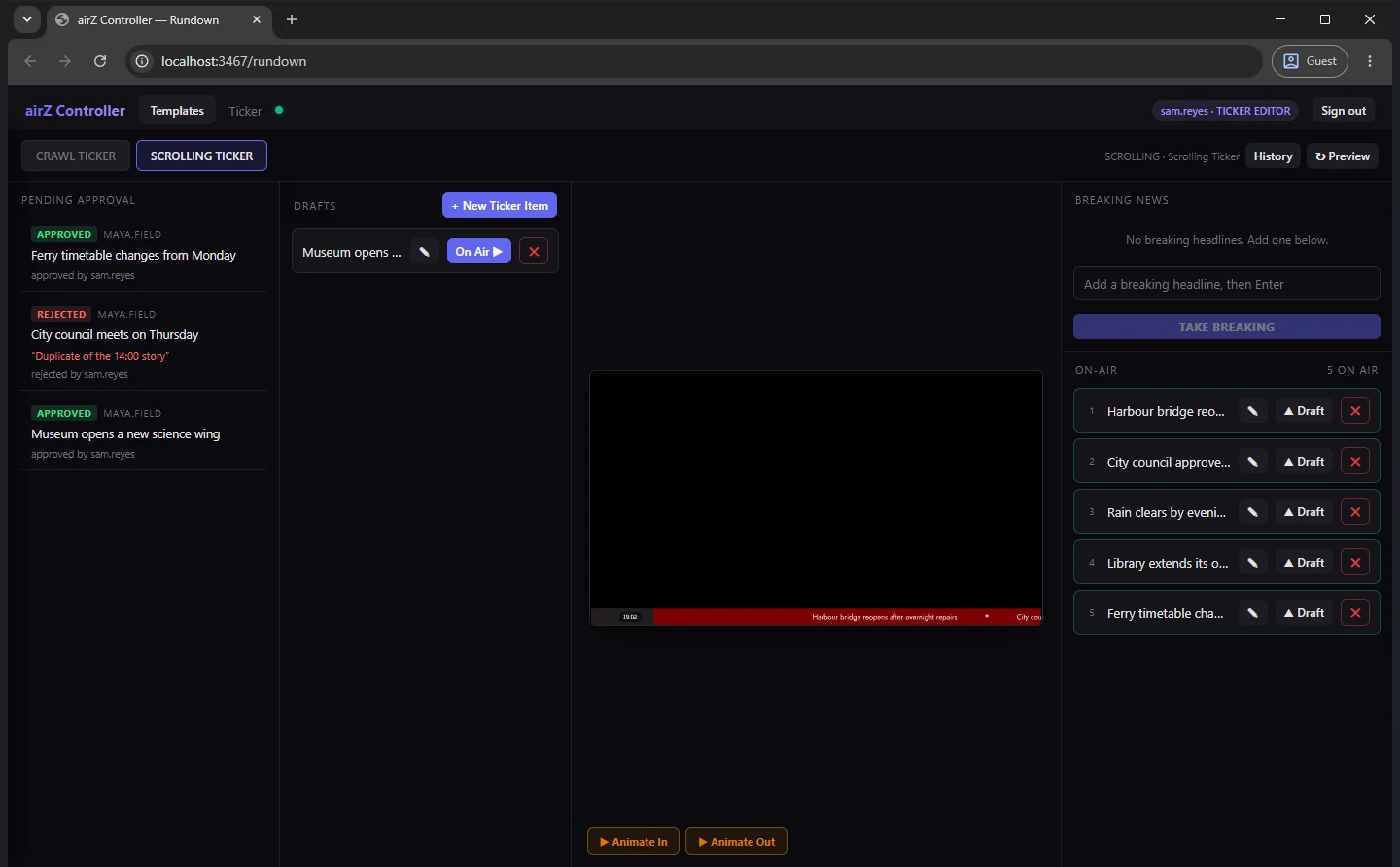
The ticker is not tied to the gallery. Through airZ Controller's web rundown, journalists work on the crawl and the scrolling ticker from any browser on the newsroom's network, and what each person can do follows their role. Nothing needs to be installed on their computers.
| In the browser | What they do |
|---|---|
| Ticker writer | Writes a headline and submits it for approval. Their list, My Submissions, shows each one as PENDING, APPROVED, REJECTED or WITHDRAWN, live, with who decided and the reason for a rejection. A pending headline can be withdrawn. A writer never puts anything on air |
| Ticker editor | Sees Pending Approval, approves a headline into the drafts or rejects it with a reason the writer reads, and sends drafts on air with On Air ▶, where they join the ticker that is already running. Edits, reorders and removes what is on air |
| Breaking news | Accounts allowed to handle breaking news, and editors, operators and admins, take breaking news from the browser with TAKE BREAKING and end it with END BREAKING |
To see the ticker desk with your own newsroom's roles, request a demonstration.
4. On air, in airZ Engine
airZ Engine renders the ticker at the channel's frame rate, as any other graphic, while the desk keeps changing it. What the preview shows is what goes to air.
Questions people ask
Can a ticker read its headlines from a database or an RSS feed?
No, by design: a news ticker is written by people. Headlines are typed at the ticker desk in airZ Controller or submitted from a browser through the web rundown, and a ticker editor decides what goes into the on-air loop.
Why does a ticker judder, and does the airZ ticker?
A ticker judders when its text does not move by the same amount every picture: it follows the computer's clock, snaps to whole pixels, moves once per frame on an interlaced channel, or misses a frame. airZ Engine moves the ticker by the same step every picture, in fractions of a pixel, field by field on interlaced channels, genlocked when house reference is connected; measured through SDI, every step stayed within a tenth of a pixel with no late or dropped frames. It needs a channel with headroom and a display or receiver running at the channel's rate.
Does editing the ticker restart it?
No. A new headline joins the loop and a corrected one changes in place with the next update, while the ticker keeps moving; nothing already on screen jumps.
What happens when breaking news ends?
The breaking band wipes back and the regular headlines resume, from the headline that was on screen when the news broke. The breaking headlines are kept for next time.
Can journalists work on the ticker from their own computers?
Yes, from a browser: through airZ Controller's web rundown, each according to their role. A ticker writer submits headlines and sees what happened to each, a ticker editor approves them and sends them into the running ticker, and permitted accounts can take breaking news. Nothing needs to be installed on their computers.
Can a journalist put a headline on air directly?
Not as a ticker writer: their copy waits for a ticker editor to approve it and send it to the loop. Who may do what is set per account.
What is the difference between a crawl and a scrolling ticker?
A crawl shows one headline at a time and moves on to the next by itself. A scrolling ticker moves every headline in the loop along the bar together, with a separator between them.
Before this: Part 4, broadcast graphics from live data.
Every step is in the manuals: the airZ Controller ticker desk and Build a ticker from a list in airZ Editor. To see it with your own newsroom, request a demonstration.
The headlines are sample text.