
Fill and key, NDI with alpha and genlock: how graphics reach the vision mixer
A graphics engine does not put a finished picture on air. It sends the vision mixer two things: the graphic itself, called the fill, and a map of where the graphic should be see-through, called the key. The mixer lays the graphic over the camera with them, in time with every other source in the studio. This article explains how that works, what goes wrong, and how airZ Engine does it.
In short
- Fill is the graphic's colour; key is its shape, white where it covers and black where the camera shows through.
- Over SDI they travel on two cables. Over NDI one stream carries both.
- Most dark edges around keyed graphics come from one setting: a premultiplied fill keyed as if it were straight.
- Genlock locks the graphics to the studio's reference signal, so the mixer can combine them with the cameras frame for frame.
What are fill and key?
The fill is what the viewer sees of the graphic: its colours, text and bars. The key is a black-and-white picture of the same frame that says how much of the graphic covers the camera at each point. White covers completely, black lets the camera through, and the greys in between are the soft edges of letters and shapes, where the graphic and the camera blend.
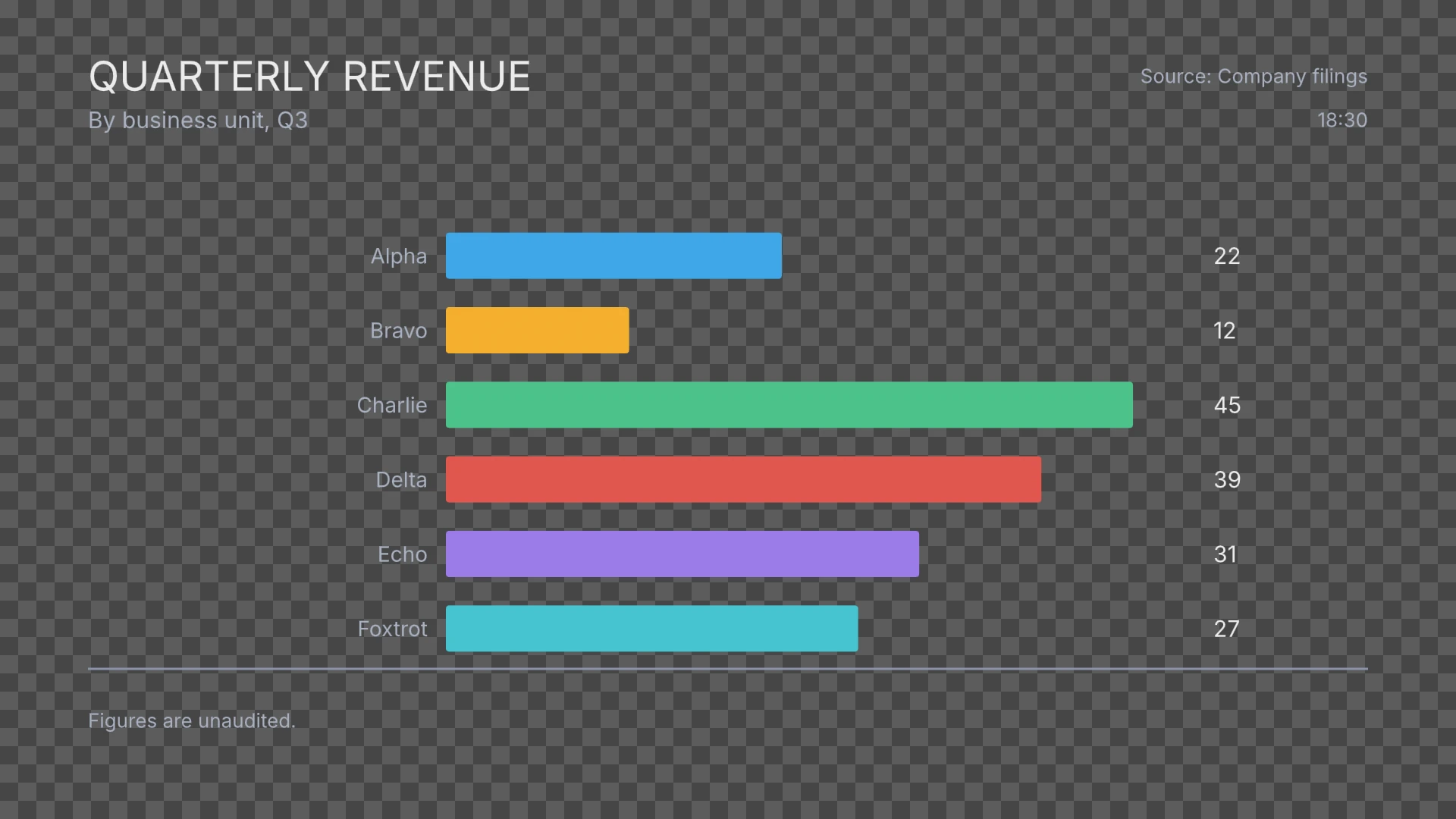
Here is the quarterly revenue chart from Part 2 with its background panel switched off, so it can sit over a camera. The checkerboard marks where it is see-through.
airZ Engine sends that one frame to the mixer as two pictures:
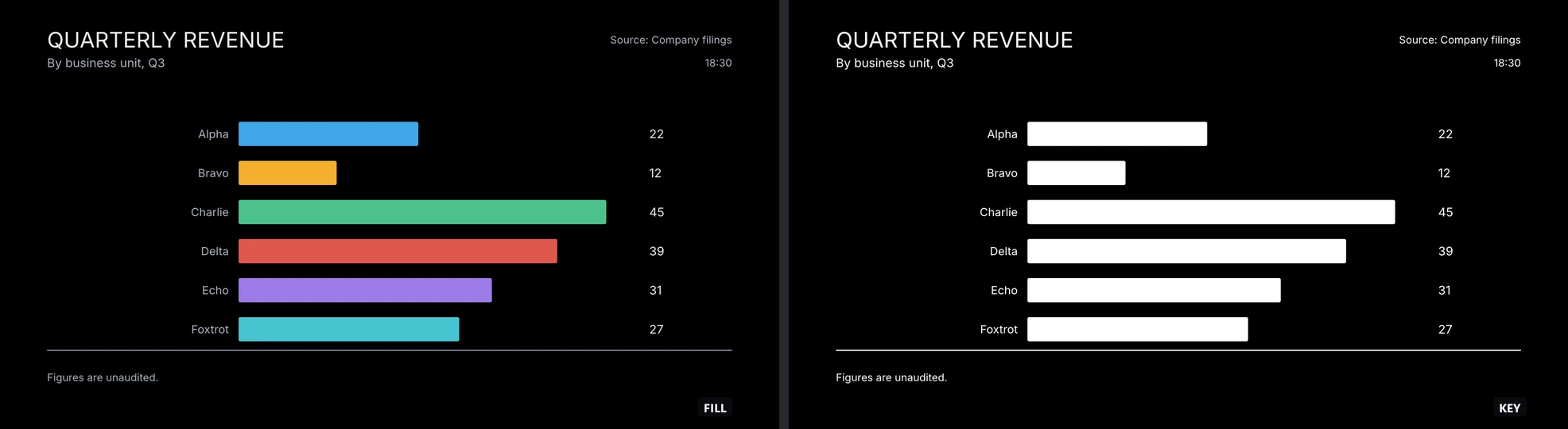
The vision mixer's keyer combines them with the camera: where the key is white it shows the fill, where it is black it shows the camera, and in between it mixes the two.
Why keyed graphics get dark edges
A fill can be sent in one of two ways, and the keyer has to be told which.
- Premultiplied (also called shaped): the colour has already been multiplied by the key, so soft edges are already faded towards black.
- Straight (also called unshaped): the colour is full strength everywhere, and only the key says how much of it to use.
If a premultiplied fill is keyed as straight, the keyer fades the edges a second time. Every soft edge, on every letter and every rounded corner, gets a thin dark outline. It is easy to miss on a monitor and obvious on a large screen.
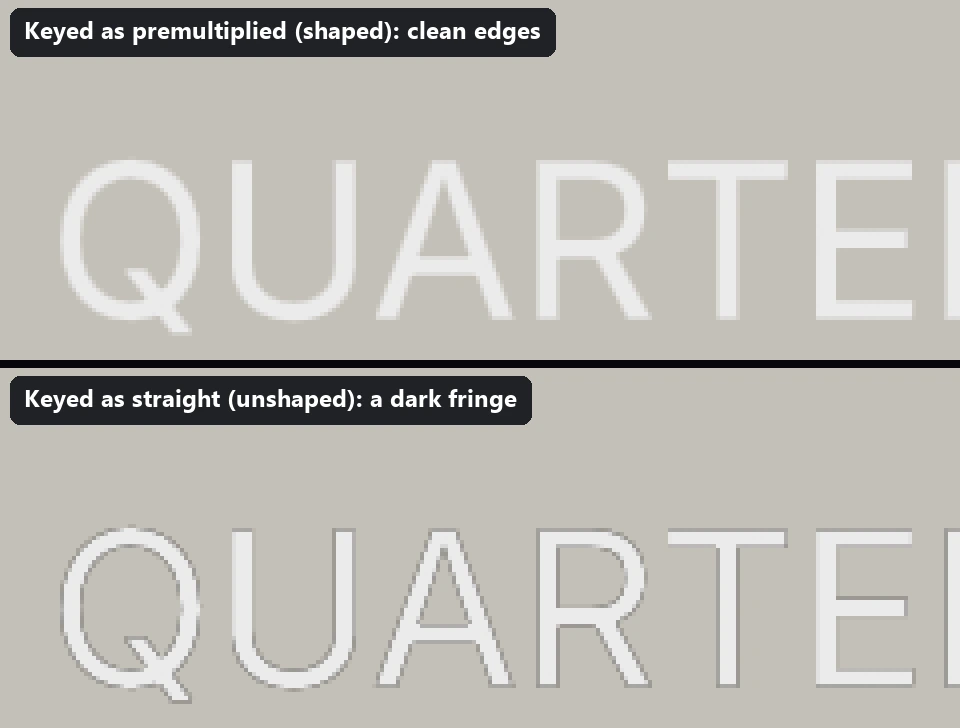
airZ Engine's SDI fill is premultiplied, and fill and key come from the same pixels, so they always match. Set the mixer's keyer for a shaped, premultiplied fill. Over NDI, airZ Engine sends straight colour by default, because that is what NDI expects; a premultiplied option exists for receivers that want it.
Two SDI cables, one NDI stream, or keyed in the engine
There are three common ways to get a keyed graphic to air. airZ Engine supports all three; keying in the engine needs an output card with a keyer.
| SDI fill and key | NDI with alpha | Keyed in the engine | |
|---|---|---|---|
| What travels | Fill on one SDI output, key on another | One stream carrying colour and alpha together | One finished picture: the graphic already over a video input |
| Where the key happens | In the vision mixer | In the receiving mixer or software | On the output card's own keyer |
| Edges | Premultiplied: set the keyer to shaped | Straight by default | Handled inside the card |
| Typical use | Broadcast studios and OB trucks with an SDI mixer | IP and software-based productions | A channel with no mixer, or a simple single-camera feed |
Why the graphics need genlock
A vision mixer combines its sources point by point, so every source has to start each frame at the same moment. Studios distribute a reference signal for this, black burst or tri-level sync, and every camera, playout server and graphics engine locks its output to it. That is genlock. A source that is not locked drifts against the others and cannot be keyed cleanly.
airZ Engine genlocks its SDI outputs to house reference, black burst or tri-level. An output can wait for the reference to lock before it plays, automatically, always or never, with a time limit, and the engine reports the reference as locked, not present or lost. Several SDI outputs, such as the feeds of a video wall, run frame-locked as one group.
Formats, frame rates and HDR
airZ Engine renders each channel at that channel's own format and frame rate, frame by frame as the graphic plays. Nothing is pre-rendered, so the graphic is always drawn natively for its output:
- HD: 720p and 1080p at 23.98 to 60, and 1080i at 50, 59.94 and 60.
- UHD and 4K: 3840×2160 and 4096×2160 at 23.98 to 60.
- SD (PAL and NTSC), and any canvas size for video walls.
- HDR: each channel is SDR, HLG or PQ, in BT.2020, processed at 16 bits, with an SDR view of an HDR channel for outputs that need SDR.
The number of channels is not fixed; it depends on the graphics card, memory and output hardware. Three 1080p59.94 channels have run together on our reference machine.
Questions people ask
Do I need two SDI outputs for one graphic?
For an external key, yes: one carries the fill and one the key, into the vision mixer's keyer. If the graphic is keyed in the engine instead, over a video input, one output carries the finished picture.
Why do my graphics have a dark outline?
Almost always the keyer is set for a straight fill while the fill is premultiplied, so the edges are faded twice. Set the keyer to shaped or premultiplied. airZ Engine's SDI fill is premultiplied.
Does NDI carry transparency?
Yes. NDI can carry an alpha channel with the picture in one stream. airZ Engine sends and receives NDI with alpha.
What does a graphics engine genlock to?
The studio's house reference: black burst or tri-level sync, fed to the output card. airZ Engine locks its SDI outputs to it and reports whether the reference is locked, not present or lost.
Can the same graphics go out in HDR?
Yes. A channel can be SDR, HLG or PQ. The graphic is rendered for the channel it plays on, and an HDR channel can also give an SDR view for SDR outputs.
Part 2, From design to air, follows this chart from airZ Editor to air. The full list of formats, inputs and outputs is in the airZ Engine specifications. To see it with your own mixer, request a demonstration.