
Augmented reality: 3D graphics that match the camera
In augmented reality, 3D objects are placed in a real camera's picture. During a show, the camera operator adds ND, changes gain, opens the iris or changes the white balance, and the picture changes with every adjustment. Objects that stay as they were designed stop looking as if they are in the room. airZ Engine follows each change, so the objects keep looking as if the same camera shot them.
What is real and what is 3D
A studio camera, locked off on a tripod, sends its picture over SDI to airZ Engine. The engine plays the camera picture on one layer and a 3D scene built for this shot on top of it. The scene's camera is set to match the real one, so the 3D objects sit where they should in the room.
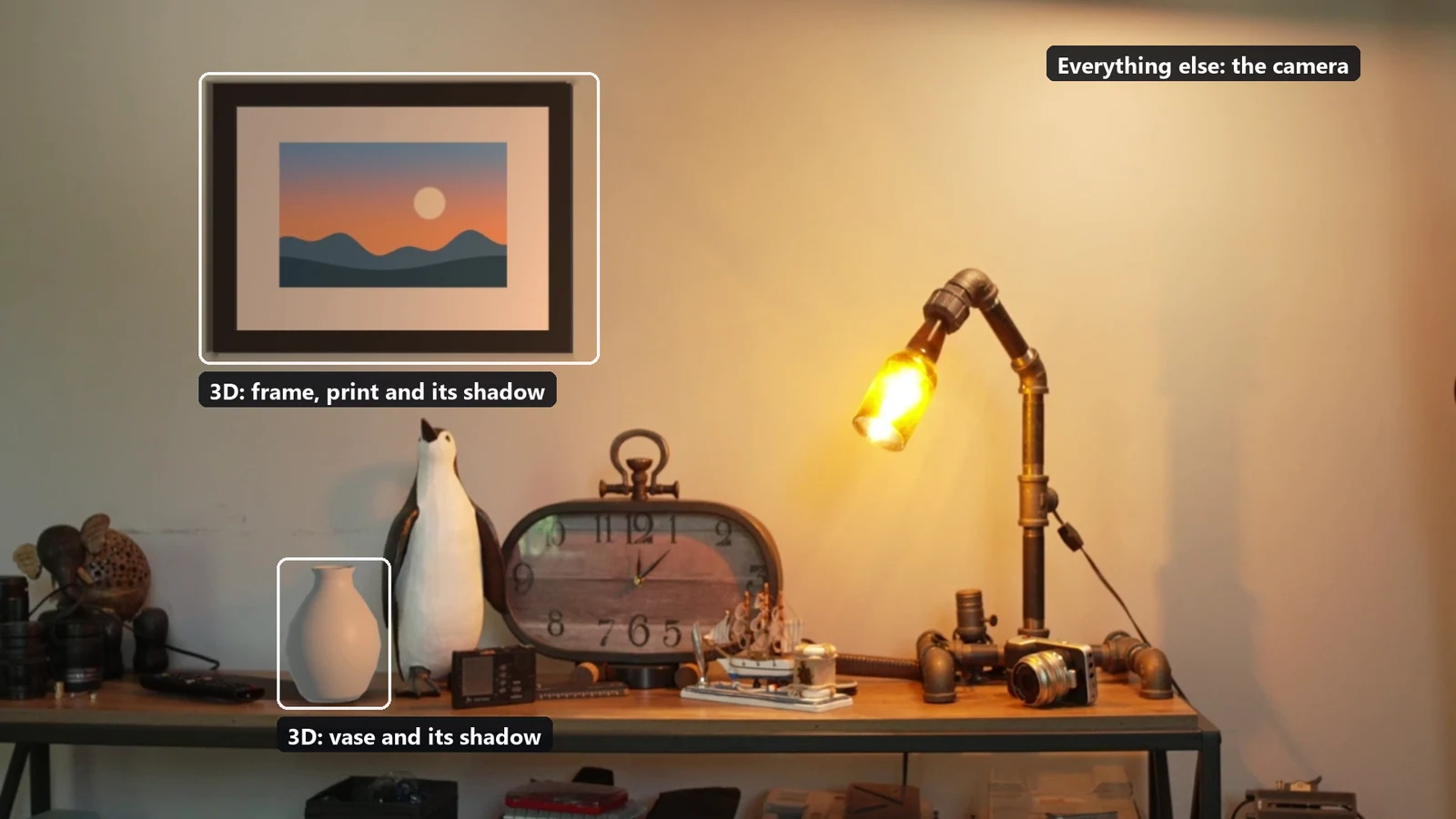
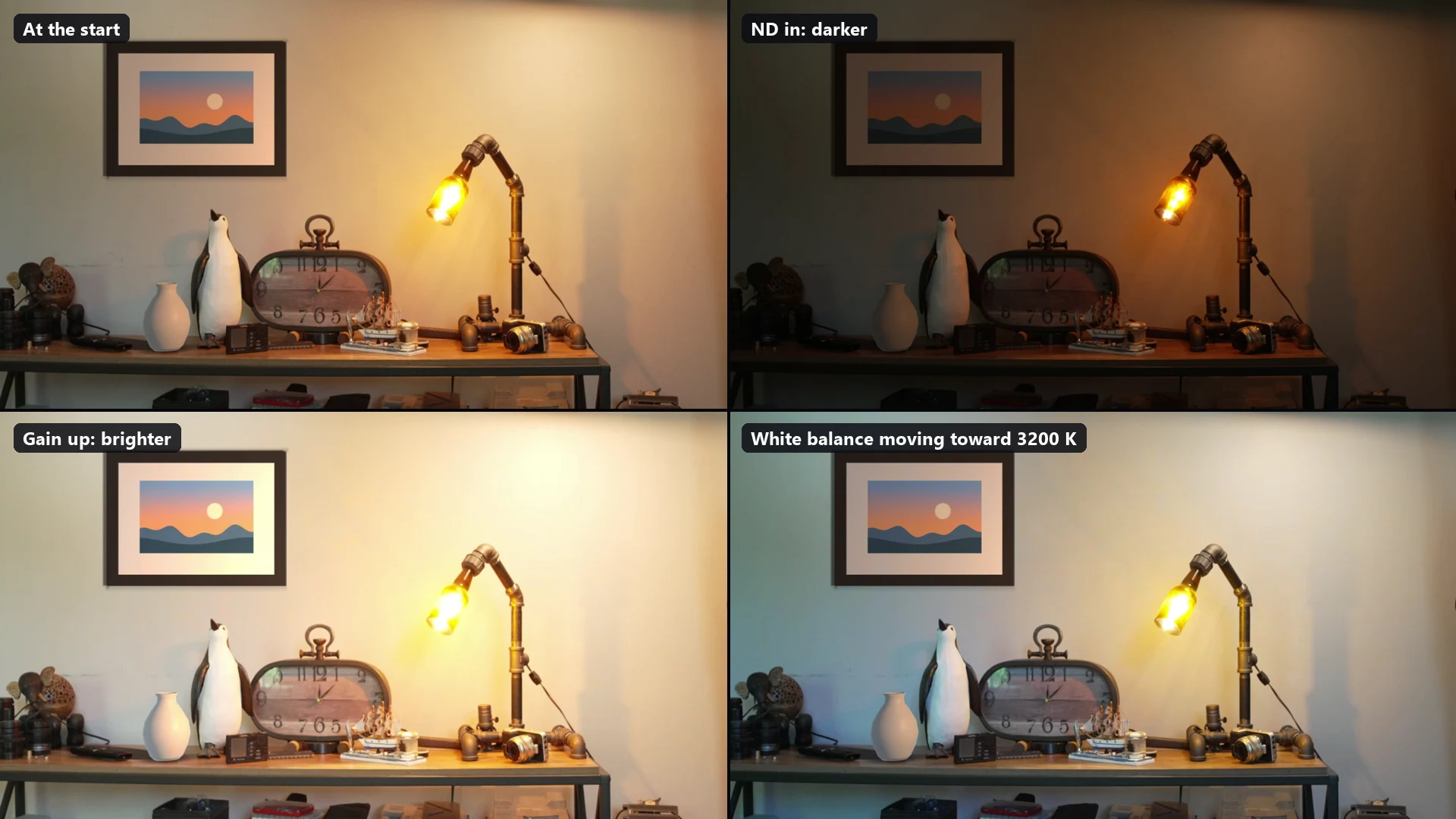
During the clip, nobody touched the graphics. Every change was made on the camera: the variable ND swept about four stops darker and back, gain went from 0 dB to 21 dB, and white balance jumped from 5500 K to 3200 K and back.
Why the camera's settings matter to a graphic
Exposure and white balance act on all the light that reaches the camera's sensor at once. When the operator adds a stop of ND, everything in the real picture gets one stop darker. A 3D render does not pass through that camera, so without help it stays exactly as designed: in a bright shot it looks pasted on, in a dark one it glows.
How airZ Engine knows what the camera did
airZ Engine finds out in two ways, and can use both at once. In this clip, exposure came from the picture and colour from the camera's settings.
From the picture. Every frame of the camera picture is compared with earlier frames at about 5,000 fixed points spread across the frame. The median of the point-by-point changes gives the change in exposure and in colour, and a line fitted through them gives the black level. When something moves through part of the frame, or the camera pans, the points that change do not agree with the rest, so the movement is not taken for a change of exposure. This runs on every frame, on its own thread, in about 3 to 5 milliseconds, and a change is seen in the frame where it happens. It needs only a clean feed of the camera's picture, without graphics in it, so it works with any camera, including a lens that cannot report its iris.
From the camera's settings. When a camera reports its white balance, gain and ND over the network, airZ Engine can take them directly. A calibration made on that camera turns each setting into what it actually does to that camera's picture. The calibration matters: on the camera in this clip, a nominal stop of gain moved the picture by about 1.2 stops, and darker pictures read warmer. Changes are eased the way the camera itself eases them: white balance ramps at the camera's own rate (a preset jump takes about 2.3 seconds), ND over about a second, and gain at once. Measured on this camera, a change reached the graphics within the same 100 milliseconds as the picture changed.
What it changes in the render
airZ Engine applies three values to the rendered 3D, in linear light, as a final grade on the render's own pixels:
- Exposure, in stops.
- White balance, as red, green and blue gains, balanced so that brightness holds.
- Black level, as a lift.
It is a grade rather than a change to the scene's lights for a reason. The camera's exposure and white balance act on the whole picture at once, so doing the same to the render reproduces what the camera did, and the designer's lighting and shading stay as they were designed.
Setting the reference
The look reference is set on airZ Engine when the shot is set up: at line-up, when the graphics look right on that camera. From then on, the graphics follow the differences from that moment. The reference is kept when the engine restarts.
When the camera's base look or LUT changes, or the camera is replaced, its calibration is made again (a calibration belongs to one camera and one look) and the look reference is set again. If the picture source is wrong, for example after a router switch, the graphics follow at most a set number of stops either way (two by default), so they cannot go somewhere absurd. A light switched on or off in the room is seen in the picture as a change of exposure, but not in the camera's settings, which only know the camera.
What it does not do
- It does not relight. If a lamp moves in the room, the 3D objects' highlights and shadows do not move with it. Those are designed into the scene; in this clip, the scene was built to match the shelf lamp.
- One white balance for the whole picture. Areas lit by different colour temperatures are not separated.
- A manual lens's iris comes from the picture only, since the lens cannot report it.
- A large object filling the frame can be partly read as a change of exposure by picture tracking.
Measured on the same camera from its settings alone, against its own picture, in a test earlier the same day: gain within 0.1 stop and 2 to 3 percent in colour, a white balance dial within 3 to 5 percent, and an extreme preset jump from 5500 K to 3200 K settling about 9 percent off.
With the other augmented reality features
Matching the look is one of four things airZ Engine does for 3D objects in a camera picture:
- Camera tracking keeps the objects in place as the camera pans, tilts and moves. This clip used a locked-off camera, so none was needed.
- Lens distortion bends the objects the way the real lens bends the picture.
- Tally tells the objects whether their camera is on air or on preview.
- Look match makes the objects look as if the same camera shot them.
How each one is set up is in the camera tracking page of the airZ Editor manual. More on augmented reality on the airZ Engine page. To see it with your own camera, request a demonstration.