
HTML in, native broadcast graphic out
An animation written as a web page, by a designer or an AI tool, can come into airZ Editor as a broadcast graphic. The page is only the way in: once imported, the graphic is airZ's own, edited, controlled and played out with no HTML and no browser anywhere between the editor and air.
In short
- airZ Editor accepts HTML as a way in: a page written to one published structure, the airZ HTML scene format, imports as a graphic.
- The import is a translation, done once. What comes out is a native airZ graphic: shapes, text, keys on a timeline, Animation States and data fields, the same as a graphic drawn in the editor.
- From then on there is no HTML. The graphic is edited in airZ Editor, driven from airZ Controller and rendered by airZ Engine.

airZ from here on: no HTML, no browser
Is the graphic on air still HTML?
No. The page is read once, when it is imported, and is not needed again. Every shape becomes an editable shape, every CSS animation becomes keys on a timeline with the same easing, the scenes become Animation States, and the marked texts and pictures become data fields. The result is saved, sent to air and played exactly like a graphic designed from scratch in airZ Editor.
That matters on air. A graphic rendered by a browser at playout depends on that browser: its version, its timing, its fonts, what the page loads. A native graphic is rendered by the playout engine itself, frame-locked to the channel, with its fonts and pictures embedded in the file. Change the graphic later and you change it in airZ Editor, not in the page.
| An HTML page | The imported airZ graphic | |
|---|---|---|
| What it is | A web page with SVG and CSS | Native shapes, text, keys and Animation States |
| Where it is edited | In a code or text editor | In airZ Editor: stage, inspector, timeline |
| How it plays | In a browser | In airZ Engine, frame-locked to the channel |
| Fonts and pictures | Files the page points to | Embedded in the graphic |
| On air | Not used | The graphic itself, with its fields and NEXT |
Why animate in HTML at all?
Because it is where ideas already are. Motion designers prototype in the browser, newsrooms have web developers, and AI tools write SVG and CSS animation fluently. A page plays anywhere, can be sent as one file, and is easy to review: open it, press the arrow key, watch the next scene.
What a page cannot do is go to air. A broadcast graphic needs a playout engine that renders it at the channel's frame rate, fields an operator can fill before the take, and a way to step through it on cue. Rebuilding the animatic by hand in a graphics package costs the time the page was meant to save.
What makes a page importable?
A shared structure. A web page can do anything a browser can, and much of that has no meaning on air. The airZ HTML scene format narrows the page to what a broadcast graphic is made of, so every part has an exact counterpart in airZ Editor:
| In the page | In airZ Editor |
|---|---|
A scene: <svg class="scene" viewBox="0 0 1920 1080" data-dur="6"> | A timeline, named after the scene |
| SVG shapes, gradients, clip shapes, dashes | Editable shapes with the same paint |
<text> lines and <tspan> runs in the page's fonts | Text with its runs, in the same font files |
| CSS keyframes of opacity, move, scale, rotation, colour, a line drawing on | Keys on the timeline, with the same easing about the same pivot |
| The scenes in page order | Animation States that play them one after another |
data-next="auto", data-loop | A scene that follows on by itself, or repeats until NEXT |
data-bind="headline" on a text | A text field the operator fills in airZ Controller |
data-bind on an <image> | A picture the operator swaps for another; named video1 or input1, a slot for live video |
data-count="7350" | A number that counts up |
Fonts sit in a fonts/ folder beside the page and pictures in images/, so the graphic carries exactly the files the browser showed.
What stays out, and why: filters and blurs, masks, video and canvas elements, pictures from the web, CSS layout inside a scene, repeating or reversing animations, stepped easing, and anything a script moves frame by frame. Each either has no fixed result a playout engine can render the same way every time, or belongs to the operator: video comes in through a picture slot instead. The import report lists anything that did not come across.
How do you write a page to the format?
Start from the kit. In airZ Editor, Assets + › HTML scene kit (guide + template)… saves the format guide and a working template with its fonts and pictures. Give both to whoever writes the page. For an AI tool, the guide carries a ready prompt:
Write a broadcast animation as one HTML page that follows the attached airZ HTML Scene format exactly, using the attached template as the model. Use only what the format allows; put the fonts I name in a fonts/ folder and the pictures in an images/ folder, declare the fonts with @font-face, and mark every text and picture the operator should be able to change with data-bind.
Check the page in a browser first. What plays there is what comes in.
What happens on import?
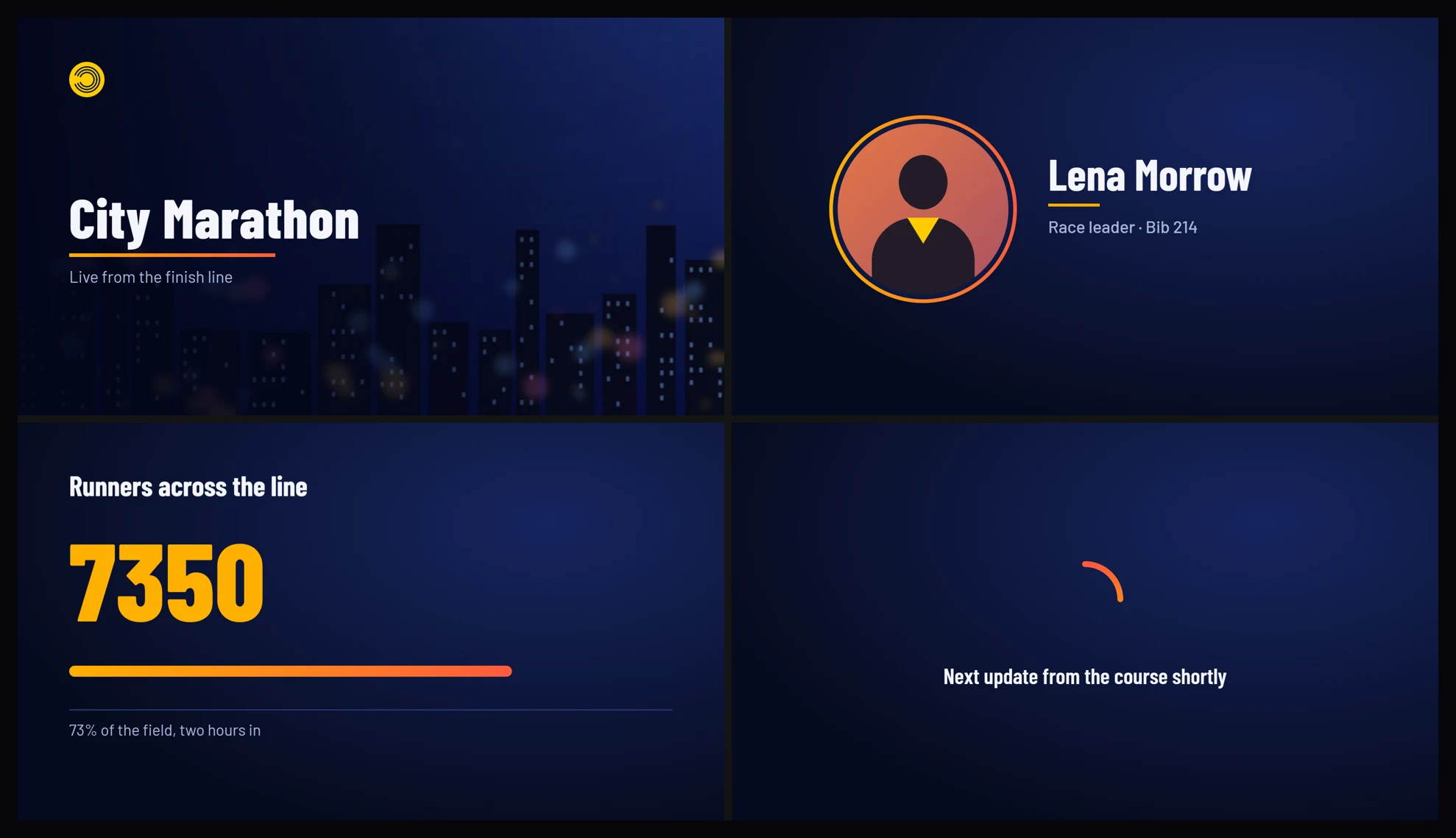
Assets + › Animation (HTML scene), or drop the .html file onto the editor. airZ Editor opens the page in the browser that ships with Windows, out of sight, and reads each scene as the browser resolved it: the drawing, and every animation with its keyframes and easing. A panel shows how far it has got, scene by scene.
The page arrives as a new artboard, here city_marathon: four scenes, seven text fields and two pictures, its fonts and pictures embedded. The translation keeps what the page looked like: compared frame by frame with the browser, under half a percent of the picture differs visibly.

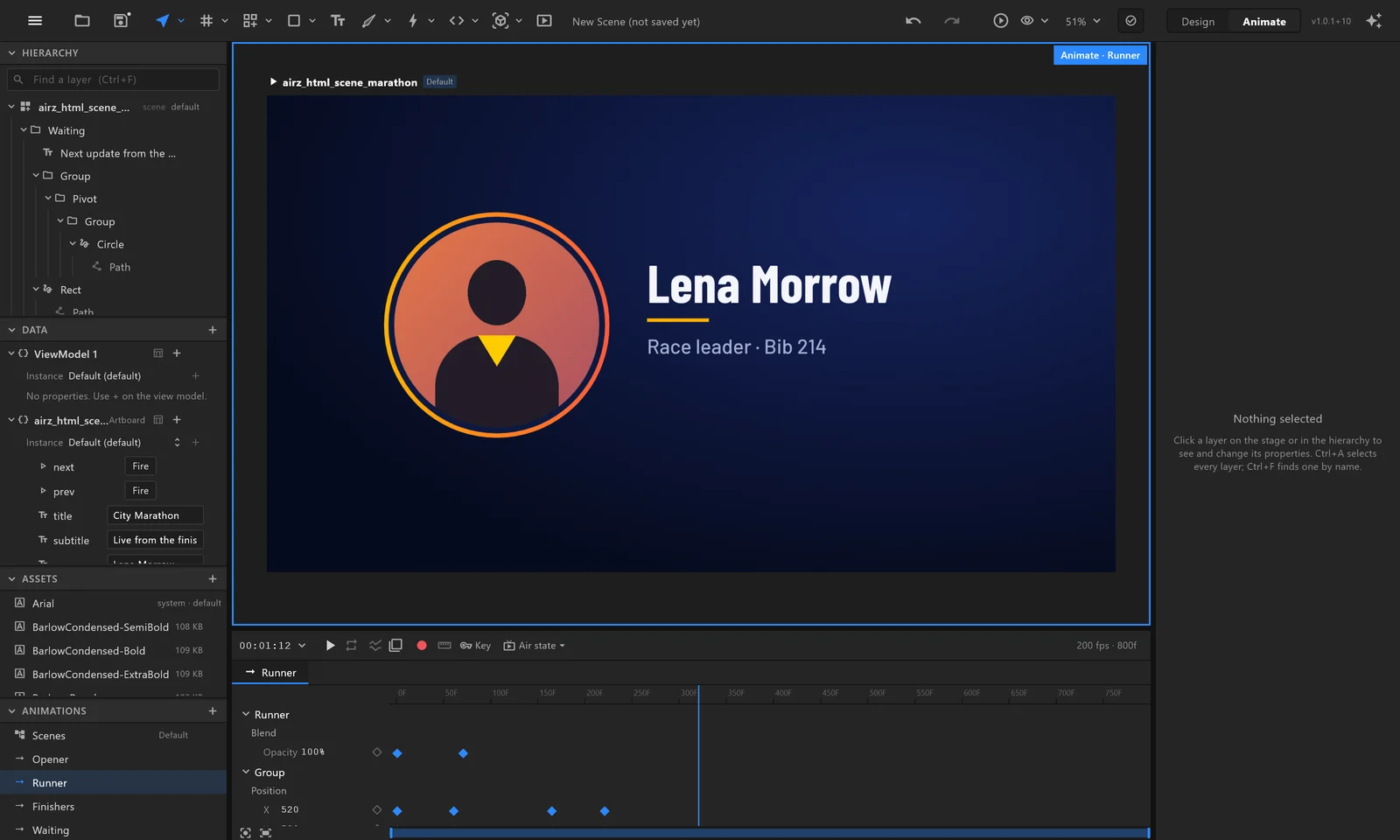
From here it is an ordinary airZ graphic, not a page. Retime a move, change a colour, swap a font, add a state: nothing is locked to the page it came from, and the page is not needed any more.

How does it reach air?
Send it to air like any graphic. In airZ Controller the operator sees the fields the page marked: the runner's name and role, the stats, the status line, and the two pictures, which the operator swaps for others. next takes the next scene and prev goes back. airZ Engine plays it as it plays everything else: the page is not involved any more.
Questions people ask
Can airZ Editor import any HTML page?
No. It imports pages written to the airZ HTML scene format: SVG scenes animated with CSS. A page outside the format may come in partly, and the import report lists what did not.
Do I need to know how to code?
No, if an AI tool writes the page: give it the format guide and the template from the HTML scene kit, and describe the animation. Someone checks the result in a browser before importing it.
Is the graphic on air still HTML?
No. The page is read once, on import, and translated into a native airZ graphic. airZ Engine renders that graphic like any other; no browser runs on air.
Do I need the HTML page after importing it?
No. Keep it if you want to change the page and import it again, but the graphic in airZ Editor is complete without it.
Can the operator change the text and pictures?
Yes, every text and picture the page marked with data-bind. A picture is swapped for another; one named like video1 or input1 takes live video, such as a camera, instead.
Why did my text come in in the wrong font?
The font file is not in the fonts folder beside the page. A web font link alone is not enough. The import report names the exact file to add.
Why don't my scenes move on by themselves?
Each scene holds at its end until NEXT, as an operator expects. Mark a scene data-next="auto" to follow on, or data-loop to repeat until NEXT.
Every step is in the manual: Bring in an HTML animation. To see it with your own pages, request a demonstration.
Runner photo in the flow animation: "woman running" by Andrew Dinh on Unsplash, cropped; the name and bib beside it are sample data. City Marathon is airZ's own example, set in Barlow (SIL Open Font License).