Appearance
Rundowns
A rundown is the running order of a show: the items you put on air, in the order you need them.
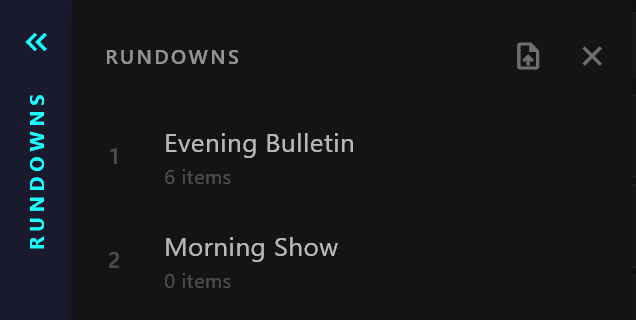
Rundowns live in the Rundowns panel. Open it from the narrow RUNDOWNS rail at the far left of the window. Each rundown shows its number and how many items it holds.
Open a rundown
- Select the RUNDOWNS rail.
- Select a rundown.
The panel closes and the rundown's items appear in Rundown Operations. airZ Controller remembers the rundown you had open and opens it again next time.
Opening another rundown does not change what is on air. You can open tomorrow's rundown to check it while today's graphics stay up.
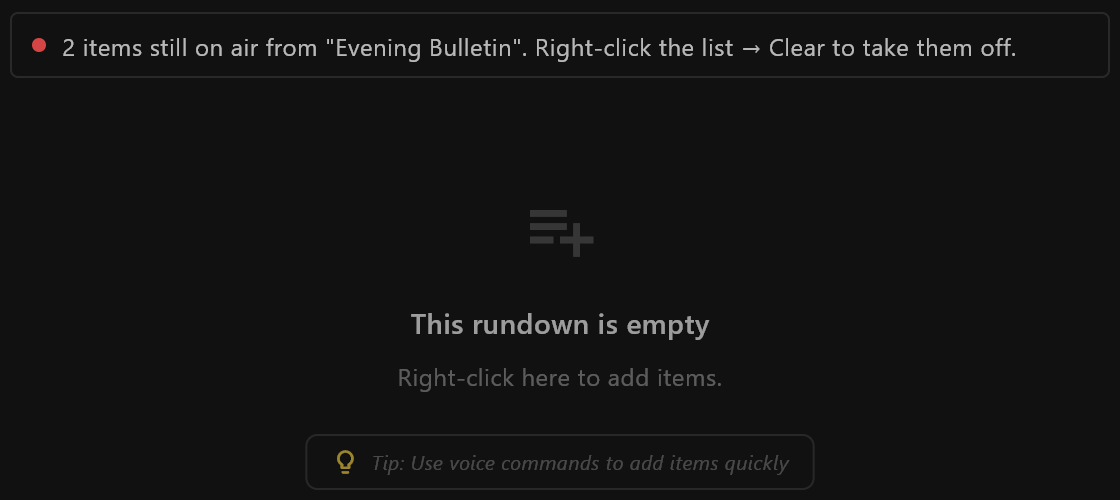
While items from the rundown you left are still on air, a note above the list says how many there are and which rundown they came from. To take them off, right-click the list and choose one of the CLEAR entries; see Taking to air. The note goes when nothing from the other rundown is on air.
To close the panel without choosing, select its ×, or select anywhere outside it.
Create a rundown

- Open the Rundowns panel.
- Type a name in Create New Rundown, at the bottom of the panel.
- Press
Enter, or select the + that appears beside the name.
If your plan's rundown limit is reached, the field says Upgrade required instead.
Rename a rundown
Double-click its name, or right-click it and choose Rename. Type the new name and press Enter, or select anywhere else. Ctrl+Z undoes a rename.
Delete a rundown
Right-click the rundown and choose Delete, or select the × that appears when you point at it. airZ Controller asks first, and says how many items the rundown holds. Enter chooses Cancel; select Delete to go ahead.
Anything from the rundown that is on air stays on air.
Deleting cannot be undone
Delete removes the rundown and every item and group in it. Ctrl+Z does not bring it back.